
Your Google Business Profile is free, takes minutes to claim, and is one of the highest-return actions you can take to get more calls, bookings, and direction requests from local customers. An optimized profile shows up in Google Search and Maps before your website does, making it your most visible digital asset. Here is what to do first, with time and cost estimates so you can plan your week.
Your 7-item quick-start checklist:
- Claim and verify your profile (30–60 minutes, free) — Search your business name on Google, claim ownership, and start the verification process.
- Standardize your NAP (15–30 minutes, free) — Name, address, and phone number must match exactly across your website, profile, and every directory listing.
- Choose your primary category (10 minutes, free) — Pick the single most accurate category for your core service. This is one of the strongest relevance signals Google uses.
- Add photos (30–60 minutes, free) — Upload at least 10 photos covering your storefront, team, vehicles, and work in progress. Refresh weekly.
- Collect and respond to reviews (ongoing, free) — Ask every satisfied customer for a review and reply to every review within 24–48 hours.
- Publish a post or offer (15 minutes, free) — Write a short update, seasonal offer, or project highlight. Post at least once a week.
- Add a booking or appointment link (10–15 minutes, free) — Connect your scheduling tool or a contact page so customers can act immediately.
A 42-item optimization checklist from The Search Sherpa estimates that a brand-new profile takes 6–12 hours to fully optimize from scratch. The seven steps above cover the highest-impact items you can complete in a single afternoon.
Key Takeaways
A fully optimized Google Business Profile, maintained with a consistent weekly routine, is among the most effective free tools available to local contractors and home-service businesses for improving map-pack visibility and driving calls.
| Point | Details |
|---|---|
| Verify first | An unverified profile can be edited by the public and may be suppressed in local results. |
| Category is the fastest relevance lever | Fixing your primary category can shift which queries you appear for within days. |
| Reviews and responses build prominence | Review velocity and response rate are among the fastest-moving signals in local rankings. |
| Weekly posts and photos maintain freshness | Google Posts lose visibility after about a week; a regular posting schedule keeps your profile active. |
| Denvercountywebdesign manages it for you | Their GBP and local SEO packages handle setup, citations, and ongoing maintenance for Denver-area contractors. |
Table of Contents
- How does Google Business Profile verification work?
- How to complete every profile field for maximum local visibility
- What photos and videos actually move the needle on your profile
- How to list your services and products so customers find the right offering
- How to build a steady review flow and respond the right way
- How to set up messaging, booking links, and Q&A
- Which GBP Insights metrics should you track every month?
- What are the local ranking factors you can actually control?
- How to fix suspensions, duplicate listings, and suggested edits
- What does a weekly and monthly GBP maintenance routine look like?
- Denvercountywebdesign handles your GBP so you can focus on the job
- Sources
- FAQ
How does Google Business Profile verification work?
Verification is the step that gives you control over your listing and signals to Google that your business is legitimate. Without it, anyone can suggest edits to your profile, and your listing may not rank as well in local results. Google’s own guidance ties verification directly to appearing in relevant local searches, so skipping it is not an option.
Available verification methods and realistic timelines:
- Postcard by mail — Google mails a postcard with a PIN to your business address. Arrival typically takes 5–14 days. This is the most common method for physical locations.
- Phone or text — Available for some business types. You receive a code immediately and verify in minutes.
- Email — Offered to select account types. Instant if available.
- Video verification — Google may request a short video walkthrough of your business location, signage, and equipment. This is increasingly common for service-area businesses and new profiles.
- Live video call — A Google representative may schedule a call to confirm your location and business type.
Step-by-step to start verification:
- Go to business.google.com and sign in with a Google account you own and control.
- Search for your business name. If a listing already exists, click “Claim this business.”
- If no listing exists, click “Add your business to Google” and fill in the details.
- Select the verification method Google offers for your account type.
- Complete the verification step and wait for confirmation before making major profile edits.
Verification is the foundation of everything else. An unverified profile can be edited by the public, and Google may suppress it in competitive local results. Verify first, then optimize.
Pro Tip: Use a Google account tied to your business domain (e.g., yourname@yourcompany.com) rather than a personal Gmail. If you ever need to transfer ownership or add a marketing partner as a manager, a business-domain account is far easier to manage and less likely to create access problems later.
One common pitfall: if a previous employee or agency set up your listing under their personal account, you may need to request ownership transfer through Google’s support process. Have your business license, utility bill, or other address documentation ready before you start that request.
How to complete every profile field for maximum local visibility
Filling out every field is not busywork. Each completed section tells Google more about who you are and which searches you should appear for. Canonical NAP consistency across your profile, website, and directories is one of the clearest ranking signals you can control.
NAP: name, address, and phone
Your business name on Google must match your real-world name exactly. Do not add keywords, city names, or service descriptors to your business name field (“Denver Plumbing Pros Fast Service” instead of “Denver Plumbing Pros”) — that is a policy violation that can trigger a suspension. Your address format should match what appears on your website contact page and in every directory listing, down to whether you write “Street” or “St.” Your phone number should be a local number, not a call-tracking number, in the primary field.
Primary and secondary categories
Your primary category is the single most important relevance signal on your profile. Choose the category that most precisely describes your main service. If you are a licensed electrician, “Electrician” beats “Contractor” every time. Secondary categories let you capture adjacent searches — an HVAC company might add “Air Conditioning Repair Service” and “Furnace Repair Service” as secondaries. Keep secondary categories accurate; adding irrelevant ones can dilute relevance.
Business description
Lead with your service, your location, and your trust signals in the first two sentences. A strong description for a Denver contractor might read: “We install and repair residential roofing across Denver and the surrounding metro. Licensed, insured, and backed by a 5-year workmanship warranty.” Keep it under 750 characters, skip links and promotional language (Google strips them anyway), and avoid keyword stuffing. Write it for the customer reading it, not for an algorithm.
Hours, special hours, and seasonal updates
Set your regular hours accurately and update them proactively for holidays, closures, and seasonal changes. Google surfaces “usually busy” and “closed now” signals prominently, and a customer who shows up to a closed business rarely comes back. Use the “Special hours” feature for holidays rather than leaving your regular hours in place.
Profile field dos and don’ts:
| Field | Do | Don’t |
|---|---|---|
| Business name | Use your real registered name | Add keywords, city names, or taglines |
| Primary category | Pick the most specific accurate match | Choose a broad category to “cover more ground” |
| Description | Lead with service + location + trust signals | Use links, all-caps, or promotional language |
| Phone number | Use a local direct number | Use a tracking number as the primary |
| Address | Match your website and directories exactly | Abbreviate inconsistently across platforms |
| Hours | Update proactively for holidays | Leave default hours during closures |
| Service area | List the cities/zip codes you actually serve | Inflate the area to appear in more searches |
What photos and videos actually move the needle on your profile
Photos are not decoration. Profiles with strong photo libraries get more clicks, more direction requests, and more calls than bare listings. The visual content you upload is often the first thing a potential customer judges you on before they ever read a word.
Types of photos that matter most for contractors and home-service businesses:
- Storefront or office exterior — Helps customers recognize your location and confirms you are a real, established business.
- Team photos — A crew in branded uniforms builds immediate trust. Customers want to know who is coming to their home.
- Vehicles and equipment — Branded trucks and professional tools signal legitimacy and scale.
- Work in progress and completed projects — Before-and-after shots are the most persuasive content a contractor can post. Show the problem, show the fix.
- Products or materials — If you stock specific brands or materials, show them.
- Interior workspace — For businesses with a physical location, an interior shot reduces anxiety for first-time visitors.
For a new profile, upload at least 10 photos before you do anything else. After that, SEMrush recommends a regular cadence of fresh photo uploads alongside weekly posts to maintain freshness signals. Aim for 2–3 new photos per week if you can manage it.
Technical basics: Upload JPGs or PNGs at a minimum of 720 x 720 pixels. Landscape orientation (16:9) tends to display better in the knowledge panel. Do not manipulate image metadata to fake a GPS location — Google’s systems flag this and it can harm your profile.
Pro Tip: Build a simple photo SOP for your crew. Ask every technician to snap two photos at each job site: one before work begins and one after completion. Send them to a shared folder or group chat at the end of each day. One week of this habit gives you more content than most competitors post in a month.
How to list your services and products so customers find the right offering
The Services section is where you tell Google exactly what you do, in the language your customers use. This is separate from your business description and carries real weight for relevance matching.
How to structure your service entries:
- Give each service a clear, specific name (“Water Heater Installation,” not just “Plumbing”).
- Write a short description (1–3 sentences) for each service. Include the location where relevant (“serving Denver and Aurora”).
- Add a price or price range where you can. Even a “Starting at $X” figure helps customers self-qualify and reduces time-wasting inquiries.
- Group related services under a category heading if Google’s interface allows it for your business type.
Products vs. Services: Use the Products section for physical goods you sell or install (specific HVAC units, roofing materials, water filtration systems). Use the Services section for the work you perform. Some business types only get one or the other; use whichever Google makes available.
Attributes to check for home-service businesses:
- Payment types accepted (credit card, financing, check)
- Online estimates or free consultations offered
- Licensed and insured (where available as an attribute)
- Veteran-owned, women-owned, or other identity attributes if applicable
- Accessibility features if you have a physical location customers visit
Dos and don’ts for services and attributes:
- Do use the exact service names customers search for.
- Do add every relevant attribute — they expand your profile’s relevance without any risk.
- Don’t list services you don’t actually offer just to appear in more searches. A mismatch between your profile and what you deliver generates negative reviews fast.
- Don’t duplicate services under slightly different names to pad the list. Google may collapse them, and it looks sloppy to customers.
How to build a steady review flow and respond the right way
Reviews are one of the most visible trust signals on your profile and a meaningful factor in local prominence. The businesses that dominate the map pack in competitive markets almost always have more reviews, more recent reviews, and higher response rates than their competitors.
A simple review-collection system:
- Ask at the close of every job. When the customer says they are happy, say: “We’d really appreciate a Google review — it takes about 60 seconds and helps us a lot.”
- Send a short follow-up text or email with a direct link to your review page. You can generate a short review link in your GBP dashboard under “Get more reviews.”
- Use a QR code on your invoice, business card, or truck wrap that goes directly to your review page. SEMrush notes that QR codes on receipts and follow-up links are among the most effective collection tactics.
- Follow up once if you don’t hear back within 3–5 days. One polite reminder is fine; more than that crosses into pressure.
- Track your review velocity — the number of new reviews per month — alongside your average rating and response rate. A drop in velocity often signals a gap in your follow-up process.
Response guidance by review type:
- 5-star review: Thank the customer by name, mention the specific service, and invite them back. Keep it genuine, not templated.
- 3–4 star review: Thank them, acknowledge any concern they raised, and offer to make it right offline. Do not get defensive.
- 1–2 star review: Stay calm and professional. Acknowledge the experience, apologize for the frustration, and provide a direct contact (phone or email) to resolve it. Never argue in public.
Responding to every review — positive or negative — signals to both Google and potential customers that you are an active, attentive business. A profile with 50 reviews and 50 responses consistently outperforms one with 50 reviews and zero responses in trust and conversion.
For tools that help you monitor and manage reviews at scale, the best review management software guide from Denvercountywebdesign covers practical options for local service businesses.
What to avoid: Never offer discounts, gift cards, or any incentive in exchange for a review. Google’s policies prohibit incentivized reviews, and the FTC has enforcement authority over undisclosed incentives. A single complaint from a customer or competitor can trigger a review removal or account action.
Google Posts, offers, and events: what to publish and when
Google Posts give you a direct content channel inside your listing. A well-timed post with a clear call to action can convert a searcher who is already looking at your profile into a call or booking.
SEMrush’s guidance is clear: posts lose visibility after approximately seven days, which means a weekly publishing cadence is the minimum to stay active. Biweekly is better if you can manage it.
Post ideas for home-service and contractor businesses:
- Seasonal tune-up or maintenance reminders (“Time to service your furnace before winter hits”)
- Limited-time offers or discounts (“10% off any new installation booked this month”)
- Completed project showcases with a before-and-after photo
- New service announcements
- Community involvement or local recognition
Cadence and CTA guide:
| Post type | Frequency | Primary objective | Example CTA |
|---|---|---|---|
| Offer/discount | Monthly | Drive bookings | “Call to claim this offer” |
| Project showcase | Weekly | Build trust and visibility | “See more of our work” |
| Seasonal reminder | Quarterly | Timely relevance | “Schedule your inspection” |
| Event or announcement | As needed | Awareness | “Learn more” |
Keep posts under 300 words. Lead with the benefit or the offer, not a company introduction. Every post should have a CTA button — “Call now,” “Book online,” or “Learn more” are the most common options.
How to set up messaging, booking links, and Q&A
These three features reduce the friction between a customer finding your profile and actually contacting you. Each one is free and takes under 15 minutes to configure.
Messaging: Enable messaging in your GBP dashboard under “Messages.” Once active, customers can text you directly from your profile. Set a welcome message that confirms you will respond within a specific timeframe (e.g., “Thanks for reaching out — we reply within 2 hours during business hours”). Google tracks your response time and displays it publicly, so set expectations you can actually meet. If you cannot monitor messages consistently, it is better to leave messaging off than to let inquiries go unanswered.
Booking links: If you use a scheduling platform (Calendly, Jobber, ServiceTitan, or a similar tool), add the booking URL to your profile under “Appointment links.” This lets customers book directly without calling, which captures leads even outside business hours.
Q&A section: This section is public and editable by anyone, which makes it both an opportunity and a risk.
- Seed the Q&A yourself by posting the questions customers ask most often (“Do you offer free estimates?” “Are you licensed and insured?” “What areas do you serve?”) and answering them as the business owner.
- Monitor the section weekly. Anyone can post a question or answer, and incorrect answers from well-meaning strangers can mislead potential customers.
- Flag and report any answers that are inaccurate or inappropriate.
Pro Tip: Set up a simple lead-tracking log for messages and booking requests. Note the source (GBP message, booking link, or call), the date, and the outcome. After 30 days, you will have a clear picture of which contact method drives the most qualified leads, and you can prioritize accordingly.
Which GBP Insights metrics should you track every month?
GBP Insights (now part of the Google Business Profile dashboard and Google Search Console) shows you exactly how customers find and interact with your profile. Tracking the right metrics monthly turns raw data into decisions.
The metrics that matter most:
- Queries that showed your profile — The actual search terms that triggered your listing. This tells you which services and locations you are already ranking for and where gaps exist.
- Customer actions — Calls, website clicks, direction requests, and booking clicks. These are your conversion metrics.
- Photo views — How often your photos are seen compared to similar businesses. A low photo-view count relative to competitors usually means you need more or better photos.
- Bookings — If you have a booking link active, track how many appointments originate from your profile.
Monthly metric review and action guide:
Track 5–10 core queries monthly, as The Search Sherpa recommends. When a query you were ranking for disappears from your list, check whether a competitor recently added more reviews, photos, or posts. That is usually the cause.
A simple monthly routine: On the first Monday of each month, spend 20 minutes in your Insights dashboard. For drops, check the corresponding profile field first (phone, hours, address). For gains, identify what changed and do more of it.
What are the local ranking factors you can actually control?
Google’s local algorithm ranks results based on three factors: relevance, distance, and prominence. Google’s official guidance describes all three, and each maps directly to specific profile actions.
Relevance is how well your profile matches what someone searched for. You improve it by choosing the right primary category, writing a clear business description, listing your specific services by name, and using the Q&A section to address common queries.
Distance is how far your business is from the searcher or the location they specified. You cannot move your business, but you can set an accurate service area that reflects where you actually work. For service-area businesses (plumbers, electricians, landscapers), removing a physical address and setting a service area correctly can improve visibility across a wider geography.
Prominence reflects how well-known and trusted your business is, both online and offline. Reviews, citations (consistent NAP mentions on directories like Yelp, Angi, and the Better Business Bureau), backlinks from local websites, and overall profile completeness all feed into prominence.
What moves fastest for home-service businesses:
- Fix your primary category first. This single change can shift which queries you appear for within days.
- Add named services with descriptions. Google indexes these for relevance matching.
- Start a review collection system immediately. Review velocity (new reviews per month) is one of the fastest-moving prominence signals.
- Build citations on the top 10–15 local directories. NAP consistency across these platforms reinforces your prominence score.
First 4–8 week prioritization checklist:
- Verify your profile and confirm all basic fields are complete.
- Set the correct primary category and add relevant secondaries.
- Standardize NAP across your website and top directories.
- Upload at least 10 photos.
- Ask your last 10 customers for a Google review.
- Publish your first Google Post.
- Enable messaging and add a booking link.
- Review Insights after 30 days and adjust based on what you see.
How to fix suspensions, duplicate listings, and suggested edits
Profile problems can quietly kill your visibility without any obvious warning. Knowing what to look for and how to respond quickly limits the damage.
Common causes of suspension:
- Keyword stuffing in the business name — Adding “Denver Best Plumber” to your name field violates Google’s naming policy and is one of the most common suspension triggers.
- Fake or virtual addresses — Using a UPS Store, a co-working space you don’t regularly staff, or a residential address for a business that doesn’t serve customers there.
- Repeated guideline violations — Multiple policy violations on the same account can lead to a hard suspension that requires a formal reinstatement request.
- Duplicate listings — Two active listings for the same business confuse Google and split your review equity.
What to do when Google applies a suggested edit you disagree with:
- Log into your GBP dashboard and check the “Edits” or “Suggestions” section.
- If an edit changed your business name, address, or hours incorrectly, reassert the correct information immediately.
- If the edit keeps reverting, it may indicate a duplicate listing or a third-party data source feeding incorrect information. Find and fix the source.
Handling duplicate listings:
- Search Google Maps for your business name and address variations to find duplicates.
- If you own the duplicate, request removal through your GBP dashboard.
- If you don’t own it, use the “Suggest an edit” option to mark it as “Permanently closed” or “Duplicate.”
- The Search Sherpa’s checklist recommends having your business license, utility bill, and verification documentation ready before contacting Google support, as these speed up dispute resolution significantly.
Troubleshooting checklist:
- Confirm your business name matches your real-world signage and registration.
- Check that your address is a real, staffed location or that you have correctly set a service area.
- Search for duplicate listings monthly.
- Monitor the “Suggested edits” section weekly.
- Keep a folder with your business license, proof of address, and verification PIN for support escalations.
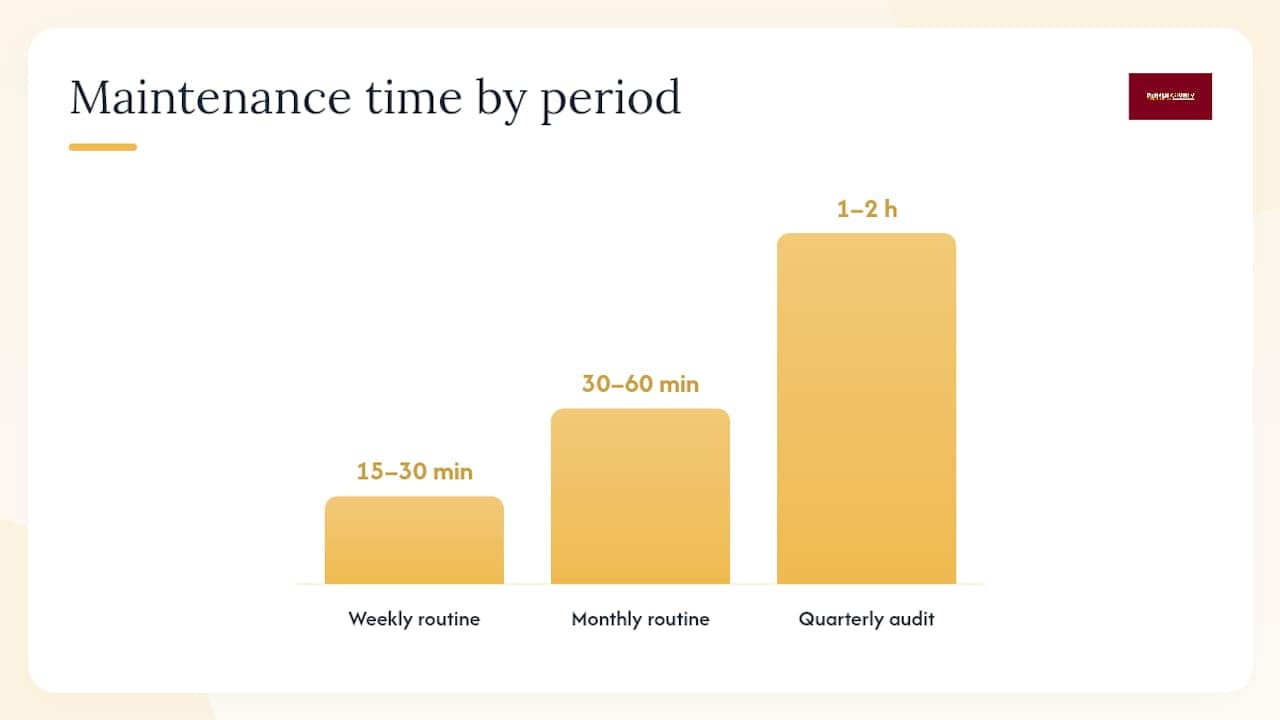
What does a weekly and monthly GBP maintenance routine look like?
A fully optimized profile is not a one-time project. The businesses that consistently rank in the map pack treat their GBP like a living asset, not a set-it-and-forget-it listing. A 42-item checklist from The Search Sherpa puts the initial build at 6–12 hours, but the ongoing work is much lighter when you build a simple routine.
Weekly tasks (15–30 minutes total):
- Publish one Google Post with a photo, a short description, and a CTA. (10 minutes)
- Upload 2–3 new job photos. (5 minutes)
- Reply to any new reviews. (5–10 minutes)
- Check and respond to any new Q&A entries or messages. (5 minutes)
Monthly tasks (30–60 minutes total):
- Review Insights: check queries, calls, direction requests, and photo views. Note any significant changes.
- Update hours for upcoming holidays or schedule changes.
- Refresh your business description or services if your offerings have changed.
- Audit your top 5 directory listings for NAP consistency.
- Check for new duplicate listings or suggested edits.
Quarterly tasks (1–2 hours):
- Full profile audit: review every field, photo, and service entry.
- Assess your review count and velocity against your top 3 local competitors.
- Add or update seasonal services and attributes.
- Review your booking link and messaging setup for any technical issues.
Who owns what:
- Owner: Review responses, major profile changes, quarterly audit.
- Office manager or marketing staff: Weekly posts, photo uploads, monthly Insights review.
- Agency or vendor: Citation building, technical SEO alignment, escalated support issues.
When to escalate to paid help: If your map-pack ranking has not improved after 8–12 weeks of consistent profile activity, the bottleneck is likely off-profile — weak citations, a thin website, or a competitor with a significantly stronger backlink profile. That is when Google Ads for contractors can bridge the gap while your organic presence catches up.
Profile changes typically take 1–4 weeks to reflect in local rankings. Category changes and new reviews tend to move the needle faster than description edits. Expect measurable map-pack improvement in 6–12 weeks for a well-maintained profile in a moderately competitive market.
Pro Tip: Block 20 minutes every Monday morning for your GBP tasks. Treat it like a standing appointment. Businesses that build this habit consistently outperform those that optimize in bursts and then go quiet for weeks.
What contractors actually gain from a strong Google Business Profile
The businesses that see the biggest lift from Google Business Profile optimization are almost always contractors and home-service providers. Here is why: the purchase intent behind searches like “plumber near me” or “roof repair Denver” is immediate. The customer is not browsing. They need someone now, and the profile that looks most complete, most active, and most trusted wins the call.

In our experience working with home-service businesses in the Denver metro, the three changes that consistently produce the fastest results are: correcting the primary category, uploading a strong set of before-and-after photos, and launching a simple review-collection system. These three actions alone can move a profile from the bottom of the local results to the top three within 6–8 weeks in mid-competition markets.
What most contractors underestimate is the compounding effect. A profile with 40 reviews, weekly posts, and fresh photos does not just rank better — it converts at a higher rate because every trust signal reinforces the next. The customer who finds you in the map pack, sees 40 reviews, a recent post, and a photo of a truck that looks like yours already feels confident before they dial.
Denvercountywebdesign handles your GBP so you can focus on the job
Home-service businesses that want faster results without spending hours each week managing their profile have a direct path: let Denvercountywebdesign handle the work.

Denvercountywebdesign builds and manages Google Business Profiles, local SEO, and lead-focused WordPress websites specifically for contractors and home-service businesses in Denver and the surrounding Colorado metro. The approach covers everything in this guide: profile setup and verification, NAP cleanup across directories, category strategy, photo uploads, review-collection workflows, and monthly Insights reporting. There are no monthly retainer traps — website projects are one-time builds you own outright, and local SEO packages are scoped to your actual needs.
If you want to know exactly where your profile stands right now, start with a free map-pack audit. It shows which ranking factors are working, which are holding you back, and what to fix first. Or visit the Denvercountywebdesign homepage to see the full range of services and get in touch directly.
Sources
- Google Business Profile
- Tips to improve your local ranking on Google
- Google My Business Guide: Optimize Your Listing – SEMrush
- Google Business Profile Optimization: checklist: 42 items for 2026 | The Search Sherpa
FAQ
How do I optimize my Google Business Profile?
Claim and verify your profile, complete every field (NAP, categories, description, hours, services), upload at least 10 photos, collect and respond to reviews consistently, and publish a Google Post at least once a week. The full process takes 6–12 hours for a new profile and about 20–30 minutes per week to maintain.
How much does Google Business Profile optimization cost?
The Google Business Profile platform itself is free. The time investment for a full optimization from scratch is roughly 6–12 hours. If you hire an agency like Denvercountywebdesign to handle setup, citation building, and ongoing management, costs vary by package scope — contact them directly for current pricing.
How long does it take to see results from GBP optimization?
Profile changes typically take 1–4 weeks to reflect in local rankings. Category corrections and new reviews tend to move rankings faster than description edits. Expect measurable map-pack improvement within 6–12 weeks for a well-maintained profile in a moderately competitive market.
Is Google Business Profile being discontinued?
No. Google retired the standalone Google My Business app several years ago, but the platform itself continues under the name Google Business Profile. You now manage your listing directly through Google Search, Google Maps, or the business.google.com dashboard.



