
Apple Business Connect has been folded into Apple Business, a free, unified dashboard at Business where you claim and manage your place card across Apple Maps, Siri, Wallet, and Messages. The platform is free to use, your existing Business Connect data is migrated automatically at launch, and your first move is simple: sign in at business.apple.com and go to Brands > Locations.
- Where to go: business.apple.com
- First action: Brands > Locations to claim, add, or update your location
- Cost: Free for place card management; local ads features may carry separate costs when available
- Surfaces affected: Apple Maps, Siri, Wallet, Messages, and device management tools
Apple Maps reaches hundreds of millions of iPhone users in the United States. Owning your place card on that surface is one of the lowest-cost, highest-leverage moves in local marketing.
Key Takeaways
Apple Business (formerly Apple Business Connect) is a free platform at business.apple.com that lets you claim, verify, and optimize your place card across Apple Maps, Siri, Wallet, and Messages from a single dashboard.
| Point | Details |
|---|---|
| Free to use | Listing and managing your place card on Apple Maps costs nothing; local ads may carry separate costs. |
| Automatic migration | Existing Business Connect data, including verified locations and photos, carried over automatically at launch. |
| Verification timeline | Document Review can take up to 5 business days; Domain Validation typically clears in 24–48 hours. |
| Showcases expire | Showcase cards expire after 30 days and require up to 3 days for Apple approval, so plan a recurring calendar. |
| Denvercountywebdesign | Handles full Apple Business setup, NAP cleanup, and tracked action URLs for contractors across Colorado. |
Table of Contents
- What Apple Business Connect was and what Apple Business now provides
- How to sign in and add or claim your location
- Verification methods, timelines, and common pitfalls
- What you can edit on your place card and how showcases work
- How roles and permissions work across your locations
- Apple Maps ads, available insights, and how to act on the data
- Why your place card directly affects local search and customer acquisition
- An agency perspective on Apple Business optimization
- Denvercountywebdesign handles your Apple Business setup and local SEO
- Sources
- FAQ
What Apple Business Connect was and what Apple Business now provides
Apple Business Connect launched as a standalone tool for managing place cards on Apple Maps. In March 2026, Apple announced it would consolidate Apple Business Connect, Apple Business Manager, and Apple Business Essentials into a single platform called Apple Business, available starting April 14, 2026.
The rebrand is more than cosmetic. Apple Business now covers:
- Place card management across Apple Maps, Siri, Wallet, and Messages
- Device management via Blueprints (previously Apple Business Manager territory)
- Business email and calendar with custom domains (previously Apple Business Essentials)
- Local advertising on Apple Maps, announced as part of the unified platform
- Automatic migration of all previously claimed locations, photos, and verification status from Business Connect
If you already had a verified place card through Apple Business Connect, you do not need to re-verify. Your data carried over. If you are starting fresh, the setup process runs through the same dashboard at business.apple.com, now under the Apple Business name.
The consolidation reflects a deliberate strategy: Apple wanted to reduce the administrative burden of managing separate tools for IT and customer-facing presence. For small businesses, that means one login handles both your team’s devices and your Maps listing.
How to sign in and add or claim your location
Apple Support documents the full Brands > Locations workflow. Here is the step-by-step path:
- Go to business.apple.com and sign in with your Apple Account. The account must have location management permissions. If you are an employee, ask your administrator to grant access before you start.
- Navigate to Brands > Locations in the left sidebar. This is where all place card controls live.
- Search for your business. Apple may already have a place card for your location pulled from public data. If it appears, select it and choose Claim this location. If nothing comes up, choose Add a new location.
- Fill in your business details. Required fields include legal business name, physical address, phone number, website URL, and business category. Hours are optional at this stage but worth adding immediately.
- Choose your verification method (covered in detail in the next section) and submit.
- Wait for verification to clear, then return to Brands > Locations to complete your place card with photos, logo, and action links.
Pro Tip: Before you type a single character into the address field, pull up your website’s contact page and your Google Business Profile. Copy the name, address, and phone number exactly as they appear there. Inconsistent formatting between your website, Google, and Apple is the single most common reason verification gets delayed or flagged.
NAP consistency matters here just as much as it does for local SEO content strategy. Apple’s systems cross-reference your submitted data against public records, and a mismatch slows everything down.
Verification methods, timelines, and common pitfalls
Apple offers three ways to verify a location, and the right one depends on your situation.
| Method | When it applies | Documents or steps required | Typical time |
|---|---|---|---|
| Phone PIN | Claiming an existing place card with a matching phone number | Receive a PIN call or text to the listed number | Minutes to 1 hour |
| Document Review | New locations or mismatched phone numbers | Lease agreement, utility bill, or insurance certificate | Verification may take several business days |
| Domain Validation | Company-level verification via DNS | Add a TXT record to your domain’s DNS settings | Typically takes a few days after DNS changes propagate |
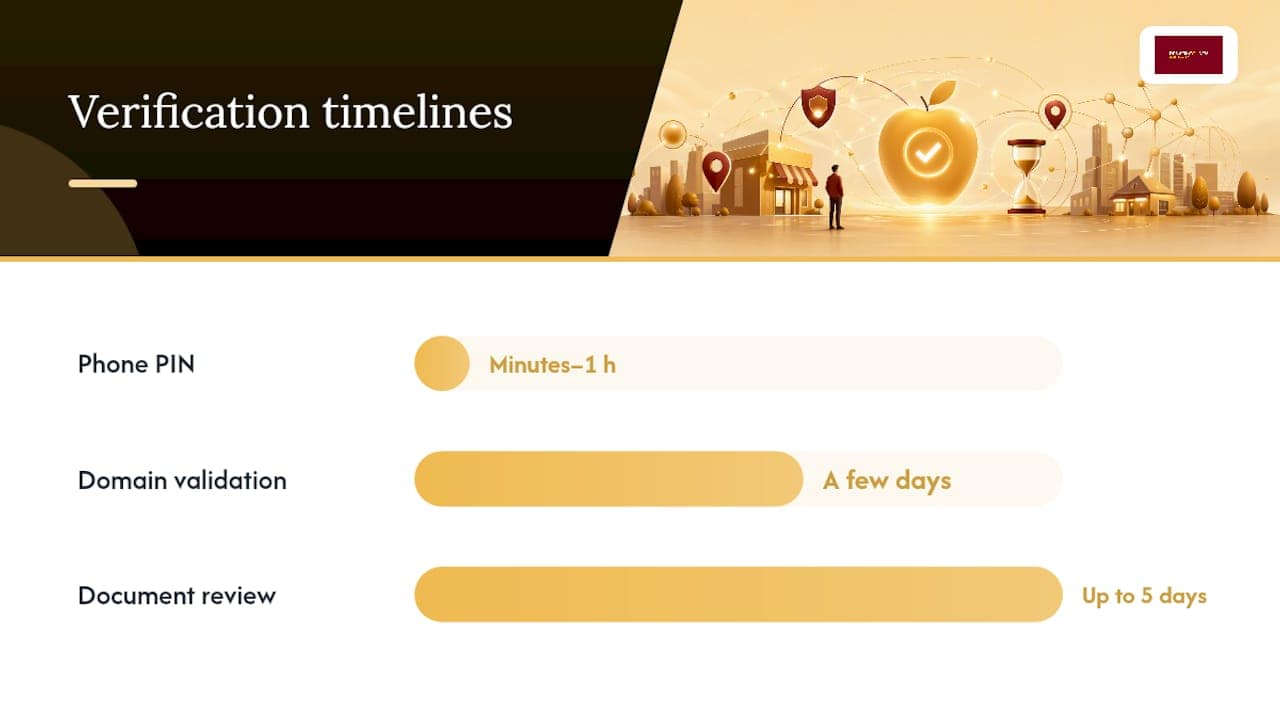
Independent reporting confirms that document review can take up to five business days in some cases, so plan accordingly if you need your listing live for a campaign or seasonal push.
Common pitfalls that delay verification:
- Wrong phone number on record. If the number Apple has on file for your place card does not match what you submit, phone PIN verification fails. Use Document Review instead and update the number after claiming.
- Inconsistent address formats. “Suite 100” vs. “Ste. 100” vs. “#100” can all cause a mismatch. Use the exact format your local post office or county records use.
- Missing or expired documents. A utility bill older than 90 days is often rejected. Use a recent statement.
- Transfer requests require extra documentation. If a location is already managed by someone else (a previous agency or employee), you must submit a transfer request through Brands > Locations along with a written justification and supporting documents. Apple reviews these manually.
If you hit a wall, Apple Support is reachable through the Help section inside the Apple Business dashboard. Do not wait out a stalled verification without contacting support; some delays are caused by a simple data mismatch that a support agent can resolve in minutes.
What you can edit on your place card and how showcases work
Your place card is what customers see when they tap your business in Apple Maps. Apple Support’s field reference covers every editable element:
- Business name, category, address, phone, website, hours, and special hours (holidays, temporary closures)
- Logo and header image (use high-resolution files; Apple recommends square logos and landscape headers)
- About/description (a short paragraph explaining what you do and who you serve)
- Photos (interior, exterior, team, work samples)
- Action links: Call, Get Directions, Visit Website, Order Online, Make a Reservation
Showcases are the marketing layer on top of the basic place card. They let you add a headline, body text, and a featured image that appears prominently when someone views your listing. A few things to know:
- Showcases require Apple approval, which can take up to three days.
- They expire after 30 days, so you need a recurring calendar to keep them fresh.
- Action links within a showcase can point to any URL, which means you can send traffic to a specific landing page or a tracked redirect.
Pro Tip: Set your action URLs to point to dedicated landing pages rather than your homepage. A plumber running a “winter pipe inspection” showcase should link to a page built specifically for that offer. You get cleaner conversion data and a better experience for the customer who taps through.
For contractors and service businesses, the “Call” and “Order/Book” actions are the highest-value links on the card. Make sure they work on mobile before you publish.
How roles and permissions work across your locations
Apple Business uses a Brands > Locations hierarchy. A Brand is the parent entity (your company), and Locations are the individual place cards beneath it. This structure matters most for businesses with more than one location, but even single-location owners should understand it.
Common roles and who should hold them:
- Owner/Administrator: Full access to add, edit, transfer, and delete locations. This role should belong to a company-controlled Apple Account, not a personal one.
- Editor: Can update place card fields, upload images, and manage showcases. Appropriate for a marketing manager or agency contact.
- Marketing: Can create and submit showcases but may have limited access to sensitive fields like legal name and address.
Pro Tip: Never tie the Owner role to a personal Apple ID. If that employee leaves, you lose administrative access to your own listing. Use a company email address to create the Apple Account that holds the Owner role, and store the credentials somewhere your whole leadership team can access.
For agencies managing multiple clients, the Brands model lets you handle many place cards from a single login while keeping each client’s data separate. Role-based access means you can give a client Editor access to their own listing without handing over full administrative control.

Apple Maps ads, available insights, and how to act on the data
Apple announced local advertising on Apple Maps as part of the Apple Business launch. This shifts Apple Maps from a passive discovery surface into an active lead channel, particularly for local service providers, contractors, and retailers who rely on proximity-based searches.
Available Insights metrics inside Apple Business include:
- Searches: How many times your business appeared in a search result
- Taps: How many users tapped your place card
- Direction requests: How many users asked Maps for directions to your location
- Calls: How many users tapped your phone number
- Action link clicks: Taps on your Order, Reserve, or Website links
Prioritize fixes based on volume. If searches are high but taps are low, your category or name may not match what users expect. If taps are high but calls are low, your action links may be buried or broken.
For contractors planning to pair Apple Maps ads with paid search, the local ads strategy principles that apply to Google carry over well. Budget for both channels and track which drives calls versus form fills.
Why your place card directly affects local search and customer acquisition
Apple Maps is the default mapping app on every iPhone, iPad, and Mac in the United States. When someone asks Siri “find a plumber near me” or searches in Maps, the results pull from place card data. A claimed, verified, and fully optimized place card ranks better than an unclaimed one. That is not a theory; it is how Apple’s system is designed.
NAP consistency across your website, Apple Business, and other citations reduces friction at every stage: verification goes faster, Siri reads your data more accurately, and customers see the same information everywhere they look. The same discipline that helps your geo-optimized content rank on Google applies directly to Apple Maps.
An actionable checklist for local service businesses:
- Claim and verify your location before doing anything else
- Publish accurate hours, including special hours for holidays
- Upload a clean logo and at least three photos (exterior, interior or work sample, team)
- Add Call and Book/Order action links with tracked URLs
- Create a showcase for your highest-margin service or current promotion
- Check Insights monthly and fix any gap between searches and taps
- Audit your NAP across your website, Apple Business, and other directories every quarter
Consider a local HVAC company that adds a “furnace tune-up” showcase in October with a direct booking link. Customers searching “HVAC near me” in Maps see the promotional card, tap through, and book directly. The Insights tab shows how many taps converted to direction requests or calls, giving the owner data to refine the next seasonal push. That feedback loop is exactly what separates businesses that treat Apple Maps as a passive listing from those that use it as a lead channel.
An agency perspective on Apple Business optimization
From where we sit at Denvercountywebdesign, Apple Business optimization follows a clear sequence: claim the location, verify it with the right method, lock in accurate NAP, then layer in photos, action links, and showcases. Most contractors we work with have never touched their Apple place card, which means there is unclaimed ground to gain immediately.
Our standard workflow for a new client includes a verified place card, tracking-enabled action URLs that feed into their analytics, and a showcase calendar tied to their seasonal services. That work connects directly to the website: the landing pages that action links point to need to convert, not just exist. A place card that sends traffic to a slow, generic homepage wastes every tap.
Denvercountywebdesign handles your Apple Business setup and local SEO
Your Apple place card is one piece of a larger local presence puzzle, and getting it right takes time you probably do not have.

Denvercountywebdesign builds and manages the full local SEO stack for home service businesses and contractors across Colorado: verified Apple Business place cards, NAP cleanup across directories, tracking-enabled action URLs, and the conversion-ready landing pages those links need to actually produce calls. No monthly retainer for the website itself. You own it outright.
If you want to know exactly where your local presence stands right now, start with a free map-pack audit. You will get a clear picture of what is claimed, what is missing, and what to fix first. Ready to go further? Visit Denvercountywebdesign to see how the full local SEO package works for contractors in your area.
Sources
Official Apple documentation and fast references for deeper reading:
- Introducing Apple Business — a new all-in-one platform for businesses of all sizes – Apple
- Add a location in Apple Business – Apple Support
- How to Use Apple Business Connect
- How to get your business on Apple Maps – Shopify
FAQ
What is Apple Business Connect used for?
Apple Business Connect was the tool for claiming and managing your business place card on Apple Maps, Siri, Wallet, and Messages. As of April 2026, it has been integrated into Apple Business, a unified platform at business.apple.com that also covers device management and business email.
Does Apple Business Connect cost anything?
Listing your business is free. Place card management, verification, and showcase creation carry no charge. Local advertising features announced as part of Apple Business may have separate costs when they become available.
How do I set up Apple Business Connect?
Sign in at business.apple.com with an Apple Account that has location management permissions, then go to Brands > Locations to search for your existing place card or add a new one. Apple Support’s setup guide walks through every field and verification option.
How long does verification take?
Phone PIN verification can complete in minutes. Domain Validation typically clears within 24–48 hours after DNS propagation. Document Review, used for new locations or mismatched records, can take up to five business days.
Can Denvercountywebdesign set this up for my business?
Yes. Denvercountywebdesign handles Apple Business place card setup, verification, NAP cleanup, and tracking-enabled action URLs as part of its local SEO packages for contractors and home service businesses in Colorado. Start with a free map-pack audit to see where your local presence stands.



