
Yes, site speed is a measurable SEO signal, and it acts as a real tiebreaker between pages of similar quality. Hit these Core Web Vitals targets first, because everything else you do for site speed SEO builds on them:
- LCP (Largest Contentful Paint): 2.5 seconds or faster
- INP (Interaction to Next Paint): 200 milliseconds or faster
- CLS (Cumulative Layout Shift): 0.1 or lower
These numbers are measured at the 75th percentile of real visitor traffic over a rolling 28 days, not on a single test run. Your TTFB (Time to First Byte) should sit under 200 milliseconds; anything past 600 milliseconds is a red flag that will drag down every other metric on this list. Your next two moves: pull your Core Web Vitals report in Search Console today, then fix hosting and caching before you touch anything else.
Key Takeaways
Site speed SEO works because Google uses real-world Core Web Vitals data as a ranking tiebreaker, and fixing hosting and TTFB before anything else produces the largest, fastest gains.
| Point | Details |
|---|---|
| Hit the numeric targets | Aim for LCP under 2.5 seconds, INP under 200 milliseconds, CLS under 0.1, and TTFB under 200 milliseconds. |
| Fix in the right order | Solve hosting and TTFB first, then caching and CDN, then images, then JavaScript. |
| Use field data, not just lab scores | Trust CrUX and Search Console over a one-time PageSpeed Insights run. |
| Watch mobile more closely | Mobile field data carries more weight for local and service-based searches. |
| Expect a delay before ranking movement | Field metrics update on a 28-day rolling window, so give changes several weeks to show results. |
Table of Contents
- What Site Speed SEO Really Measures
- Why Speed Moves Rankings and Revenue
- How to Measure Site Speed Without Chasing Fake Scores
- The Priority Action Plan: Fix Things in This Order
- WordPress Quick Wins for Faster Load Times
- Tracking Progress Without Losing Patience
- Our Approach to Speed for Local Service Sites
- Beyond Core Web Vitals: What Speed Does to User Behavior
- Desktop vs. Mobile: Why Your Phone Score Matters More
- Misconceptions That Waste Time and Money
- An Editorial Take on Fixing Speed in the Right Order
- Sources
- FAQ
What Site Speed SEO Really Measures
Site speed SEO comes down to four numbers, and each one flags a different kind of user frustration. LCP tracks how long it takes your biggest visible element (usually a hero image or headline block) to render. INP measures how fast your page responds when someone taps a button or fills a form. CLS catches the jarring jump when a page shifts under someone’s thumb because an ad or image loaded late. TTFB clocks how long your server takes to respond before the browser can do anything at all.
Google doesn’t judge you on one visit. It looks at the 75th percentile of all real user sessions over 28 days, which means one lucky fast load doesn’t save you and one slow session doesn’t sink you. The pattern is what matters.
Here’s the practical mapping:
- Slow-loading images or unoptimized hero banners → poor LCP
- Heavy JavaScript blocking the main thread → poor INP
- Ads, fonts, or embeds loading after the page renders → poor CLS
- Weak hosting or bloated server-side code → poor TTFB, which drags every other metric down with it
Why Speed Moves Rankings and Revenue
Speed won’t push a thin page above a well-researched competitor. It acts as a tiebreaker among pages of similar relevance and quality, which means it’s the deciding factor far more often than most site owners realize. Two contractors targeting “emergency plumber Denver” with comparable content? The faster site usually wins the click and the ranking nod.
The indirect effects matter just as much as the direct ones. Faster pages get crawled more efficiently, which means Google indexes your new service pages sooner. Visitors who land on a fast page stick around longer, click into more pages, and convert at higher rates. Slow pages train visitors to bounce before they even see your offer.
Consider the compounding effect:
- Faster crawl budget usage means new content gets discovered quicker
- Lower bounce rates signal relevance back to Google
- Higher session depth exposes visitors to more conversion points
- Better mobile speed directly supports local intent searches, where urgency is high
Speed doesn’t replace good content and earned links. It amplifies whatever content and links you already have.
How to Measure Site Speed Without Chasing Fake Scores
Lab data and field data measure two different things, and confusing them wastes hours. Lighthouse and PageSpeed Insights run a lab test: a single simulated load under controlled conditions. That’s useful for debugging, but it isn’t what Google uses to rank you. Google ranks based on CrUX (Chrome User Experience Report) field data pulled from real Chrome visitors, which you can view directly in Search Console’s Core Web Vitals report.
Here’s the right testing sequence:
- Check Search Console first. This shows your actual field data and which URL groups are failing.
- Run PageSpeed Insights on the specific failing page to see both the CrUX summary and a lab diagnosis.
- Use WebPageTest for a waterfall and filmstrip view when you need to see exactly which request is stalling the page.
- Run GTmetrix as a second opinion when you want a different testing location or connection profile.
Always test the canonical URL, not a staging copy, with mobile emulation switched on and browser extensions disabled.
Pro Tip: Run your speed test in an incognito window. Browser extensions like ad blockers and password managers can quietly skew your lab scores by blocking or delaying scripts that load normally for real visitors.
The Priority Action Plan: Fix Things in This Order
Random optimization wastes time. Fixing things out of order means you polish images while a slow server erases the gain. Here’s the sequence that delivers the biggest jump in site speed SEO for the least effort, based on where the bottlenecks actually live.
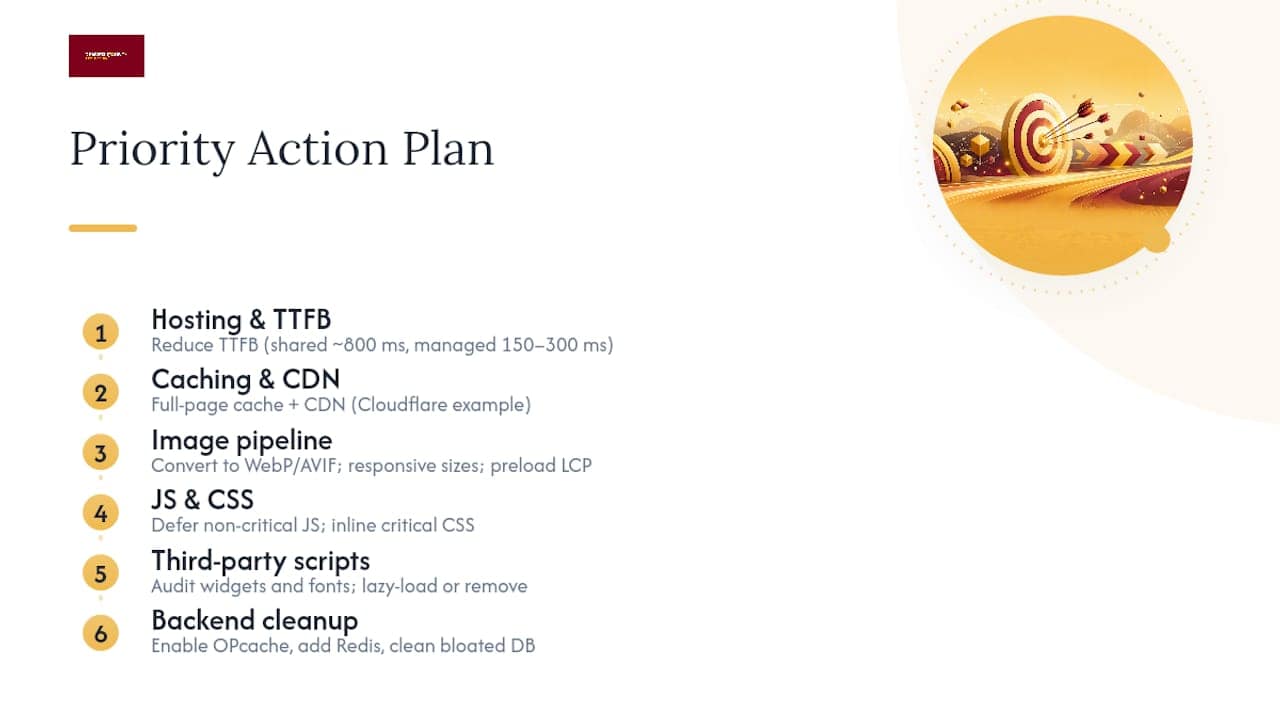
1. Fix hosting and TTFB first. This is the foundation everything else sits on. Shared hosting commonly produces TTFB around 800 milliseconds; managed WordPress hosting routinely brings that down to 150 to 300 milliseconds. No amount of image compression fixes a server that’s slow to respond.
2. Add server-level caching and a CDN. Full-page caching paired with a content delivery network like Cloudflare cuts repeat load times dramatically because visitors pull cached files from a server near them instead of your origin server every time.
3. Rebuild your image pipeline. Convert images to WebP or AVIF, add srcset for responsive sizing, set explicit width and height attributes to prevent layout shift, and preload your LCP image specifically.
4. Defer non-critical JavaScript and trim unused CSS. Inline the CSS needed for the visible portion of the page and push everything else to load after initial render.
5. Audit third-party scripts and fonts. Chat widgets, tracking pixels, and social embeds each add their own request chain. Lazy-load what you can and cut what you don’t use.
6. Clean up the backend. For dynamic sites, enable OPcache, add Redis or another object cache layer, and clear out bloated database tables from old plugins or abandoned form entries.
Pro Tip: Fixing steps two through six before step one is like repainting a car with a broken engine. Server response time sets the ceiling for how fast anything downstream can possibly load.
WordPress Quick Wins for Faster Load Times
WordPress speed problems repeat across nearly every site: cheap hosting, plugin bloat, no caching, unoptimized images. In fact, most WordPress sites pass Core Web Vitals less than half the time, with average mobile load times around 3.8 seconds. Here’s the fix list that maps directly to the priority plan above:
- Move off shared hosting to a managed WordPress host to lower your TTFB floor immediately
- Enable server-level caching plus Redis object caching; if your host lacks server caching, add a caching plugin instead
- Audit every installed plugin and remove anything inactive; heavy page builders and stacked analytics scripts are common repeat offenders
- Convert images to WebP, preload the LCP image, set explicit width and height attributes, and lazy-load everything below the fold correctly
Pro Tip: A plugin count under 15 to 20 active plugins is a reasonable target for most small business sites. If you’re past 30, you’re likely carrying duplicate functionality that’s fighting itself in the background.
Tracking Progress Without Losing Patience
Field data updates on a rolling 28-day window, so expect ranking movement to follow your fixes by several weeks, not days. Use Search Console’s Core Web Vitals report and CrUX data for the real verification; save synthetic tools like PageSpeed Insights and WebPageTest for troubleshooting specific pages while you work.
Build a simple dashboard and check it monthly:
- LCP, INP, and CLS trends by URL group
- TTFB average across your top landing pages
- Pages per session and average session duration
- Conversion rate on your core service and contact pages
If the field numbers hold steady but the business metrics move, you’re seeing the real payoff.
Our Approach to Speed for Local Service Sites
Denvercountywebdesign builds every custom WordPress site around the priority order above, starting with hosting and caching before a single image gets touched. That sequence isn’t arbitrary. It’s the order that actually produces measurable gains for contractors competing on Google Maps and local search.
One documented result across numerous client engagements: a 243% increase in organic traffic within 90 days, driven by combining fast, SEO-ready builds with local SEO fundamentals rather than treating speed as a separate project.
- Sites are delivered fully owned by the client, with no recurring monthly fee locking up the technical work
- Local SEO, Google Business Profile management, and AI search optimization get layered on top of a speed-first build, not bolted onto a slow one
- Home service businesses in Denver and the surrounding metro area see faster indexing and more booked jobs when the foundation is solid before the marketing starts
Beyond Core Web Vitals: What Speed Does to User Behavior
Core Web Vitals grab the headlines, but the user experience metrics sitting underneath them tell the real story of what slow pages cost you. Bounce rate is the clearest one. A visitor who taps a search result and waits on a blank screen doesn’t file a complaint. They just leave, and that single action tells Google the page failed to satisfy the query, regardless of how good your content actually is.

Session duration follows the same pattern in reverse. Fast pages don’t just avoid bounces, they invite deeper browsing. A visitor who loads your homepage instantly is far more likely to click into your services page, then your reviews, then your contact form, simply because nothing interrupted the momentum. Every extra second of load time adds friction to that chain, and friction compounds across a session the way it compounds across a single page load.
Scroll depth and pages per session both track this same underlying behavior. Slow sites see visitors stall near the top of the page and never scroll far enough to see a call to action. Fast sites see visitors move through content the way they’d flip through a well-organized binder, quickly and without hesitation.
None of these are official Core Web Vitals, but Google’s engagement signals lean on the same underlying behavior. A page that keeps people around longer and pulls them deeper into a site is doing something right, and speed is usually the reason why.
Desktop vs. Mobile: Why Your Phone Score Matters More
Google evaluates desktop and mobile experiences separately, and it weights mobile field data more heavily for most searches because most local and service-based queries happen on a phone. Someone searching “electrician near me” while standing in a dark garage isn’t waiting around for a bloated homepage to finish loading fonts and tracking scripts.
Desktop connections and processors are more forgiving. A page that limps along on a mid-range Android device on a spotty 4G connection might feel perfectly fine on a fiber connection and a new laptop. That gap is exactly why testing only on your office desktop gives you a false sense of security. Your Core Web Vitals report in Search Console breaks results out by device type for this exact reason, and the mobile numbers deserve more of your attention if your business depends on local, on-the-go searches.
This split also affects prioritization. If your mobile LCP is failing but desktop is passing, don’t split your effort evenly. Fix the mobile experience first, because that’s where the volume and the urgency both live for home service and contractor searches. A partner resource on mobile search behavior makes the same point from the local-visibility angle: mobile speed and mobile intent are tied together tightly enough that treating them as separate projects wastes effort.
Misconceptions That Waste Time and Money
The biggest misconception in site speed SEO is treating a perfect lab score as the goal. A 100 on PageSpeed Insights feels satisfying, but Google ranks based on real user CrUX data, not your best-case lab run. You can hit a perfect lab score and still fail Core Web Vitals in the field if your actual visitors are on slower connections and older devices than your test simulated.
The second common mistake is optimizing images while ignoring a slow server. Compressing a hero image from 2MB to 200KB does nothing if your TTFB is already eating 800 milliseconds before that image even starts downloading. Fix order matters more than fix completeness.
A third pitfall: assuming a caching plugin alone solves everything. Caching helps repeat visits and static pages, but it doesn’t fix a bloated database, an unoptimized theme, or JavaScript that blocks rendering on first load. It’s one piece of a sequence, not a substitute for the whole plan.
Finally, plenty of site owners chase a single perfect score once and never look again. Speed isn’t a one-time project. New plugins, new images, and new third-party scripts creep back in over months, and a site that passed Core Web Vitals in January can fail again by summer without anyone noticing until traffic drops.
An Editorial Take on Fixing Speed in the Right Order
Most site speed advice treats every fix as equally urgent, and that’s the flaw. Compressing images matters far less than fixing TTFB, yet most guides bury hosting advice on page three behind a dozen plugin recommendations. The evidence points the other way: server response time sets a ceiling that front-end tweaks can’t break through.
The conventional wisdom oversells caching plugins as a complete solution. They’re one piece of a sequence, not a silver bullet, and treating them as the finish line explains why so many sites plateau just short of passing Core Web Vitals. What actually works is boring and sequential: hosting, then caching, then images, then scripts. Skip a step and you’re optimizing around a bottleneck instead of removing it.
If you take one thing from this, prioritize the server layer before you touch a single image. Everything downstream depends on it, and no amount of front-end polish fixes a slow foundation.
— Luis
Sources
- Core Web Vitals
- How to Speed Up Your WordPress Site (2026 Guide) | PageSpeed Matters
- How page speed affects rankings
FAQ
What Is Site Speed in SEO?
Site speed in SEO refers to how quickly your page loads and responds for real visitors, measured through Core Web Vitals like LCP, INP, and CLS. Google uses these field metrics as a tiebreaking ranking signal between pages of similar quality.
How Much Does Site Speed Affect SEO?
Speed won’t outrank a page with weak content, but it acts as a meaningful tiebreaker among similarly relevant pages, and it directly affects bounce rate, session depth, and conversions regardless of ranking position.
What Is a Good Site Speed?
A good target is LCP under 2.5 seconds, INP under 200 milliseconds, CLS under 0.1, and TTFB under 200 milliseconds, all measured at the 75th percentile of real user data over 28 days.
How Do I Fix Slow Site Speed?
Start with hosting and TTFB, then add server-level caching and a CDN, then optimize your image pipeline, then defer non-critical JavaScript, in that order for the biggest gains with the least wasted effort.
Ready to see where your site actually stands? Denvercountywebdesign builds fast, fully-owned WordPress sites for Colorado contractors and home service businesses, with no monthly fees eating into your budget. Check out the Denver web design services built around this exact priority order, browse the Brighton, CO web design page for a real example, or grab a free SEO audit to see exactly where your hosting, caching, and images stand right now.



