
Core Web Vitals are three metrics Google uses to measure how fast, responsive, and visually stable your site feels to real visitors: Largest Contentful Paint (LCP), Interaction to Next Paint (INP), and Cumulative Layout Shift (CLS). A “good” score means LCP at 2.5 seconds or faster, INP at 200 milliseconds or faster, and CLS at 0.1 or lower, all measured at the 75th percentile of your visitors.
These numbers matter for two reasons. First, slow or jumpy pages frustrate visitors and drive them off before they call, book, or buy. Second, Google treats page experience as a tiebreaker in search rankings, so a site that clears these thresholds has a real edge over a competitor stuck in “needs improvement.”
- LCP ≤ 2.5s — your biggest visible element loads fast
- INP ≤ 200ms — your site responds quickly when someone taps or clicks
- CLS ≤ 0.1 — your layout stays put while the page loads
Key Takeaways
Passing Core Web Vitals requires fixing server response time first, prioritizing your LCP resource, and reserving layout space before chasing smaller optimizations.
| Point | Details |
|---|---|
| Know your thresholds | Aim for LCP ≤2.5s, INP ≤200ms, and CLS ≤0.1 at the 75th percentile. |
| Measure field before lab | Check Search Console and CrUX first, then use Lighthouse to find root causes. |
| Fix hosting before code | Upgrading to managed hosting with caching often resolves LCP without touching your codebase. |
| WordPress fixes follow an order | Hosting, then caching, then plugin audit, then media and fonts. |
| Monitor after every change | Re-check p75 scores in Search Console over time rather than trusting one lab test. |
Where to Go Deeper
- Web
- Google Search Central: Core Web Vitals and Search
- Chrome UX Report and PageSpeed Insights data
- WebPageTest for network-level traces
Table of Contents
- Understanding the Core Web Vitals Metrics
- Core Web Vitals Thresholds and How Scoring Works
- How to Measure Core Web Vitals the Right Way
- High-Impact Fixes for LCP, INP, and CLS
- Why WordPress Sites Struggle With Core Web Vitals
- A Repeatable Workflow for Diagnosing and Fixing Failures
- Our Take on What Actually Moves the Needle
- Sources
- FAQ
Understanding the Core Web Vitals Metrics
Each metric tracks a different kind of frustration, and knowing which one you’re fighting changes how you fix it.
LCP measures how long it takes your largest visible element to render. That’s usually a hero image, a big headline, or a video poster frame. If your homepage banner takes four seconds to appear, visitors assume the site is broken and bounce before they read a word of your pitch.

INP measures how quickly your page responds to clicks, taps, and keystrokes across the entire visit, not just the first interaction. It replaced First Input Delay (FID) in 2024 because FID only captured that first click. INP tracks every interaction and reports the slowest one that matters, which exposes long-running JavaScript tasks that freeze the page after someone’s already been using it for a while.
CLS measures how much your layout jumps around as the page loads. Common culprits:
- Images or ads with no width and height set, so the page reflows once they load
- Web fonts that swap in and push text around
- Third-party embeds (chat widgets, reviews, video players) that inject content late
Core Web Vitals Thresholds and How Scoring Works
Google buckets every metric into three tiers, and your site’s rating comes from the slowest experiences your real visitors have, not your fastest ones.
| Metric | Good | Needs Improvement | Poor |
|---|---|---|---|
| LCP | ≤2.5s | 2.5s to 4s | >4s |
| INP | ≤200ms | 200 milliseconds to — | > 200 milliseconds |
| CLS | ≤0.1 | 0.1 to — | > 0.1 |
That “75th percentile” rule is the part most site owners miss. Google evaluates the slowest quarter of your traffic, not the median. A page that feels snappy on your office Wi-Fi can still fail if a quarter of your mobile visitors on spotty 4G are waiting three seconds longer. Scores are also segmented by device type, so your mobile and desktop numbers can, and often do, tell two different stories.
How to Measure Core Web Vitals the Right Way
You need two categories of tools working together: field data that shows what’s actually happening to real visitors, and lab tools that let you reproduce and debug a specific problem.
- Start with Search Console’s Core Web Vitals report. It pulls from the Chrome UX Report (CrUX) and groups your URLs by status, so you can see exactly which page templates are failing and how many URLs are affected.
- Run PageSpeed Insights on your worst offenders. It shows both field data (if the page has enough traffic to qualify) and a fresh lab test, giving you a combined snapshot in one report.
- Open Lighthouse or Chrome DevTools for root-cause work. These generate performance traces that show exactly which script or resource is blocking your LCP or triggering a layout shift.
- Instrument the web-vitals JavaScript library if you want production-level analytics. It lets you log real user metrics segmented by page, device, or traffic source, which is invaluable once you’re managing dozens of templates.
A quick way to remember the split: field tools tell you what’s broken and for how many people; lab tools tell you why. Skipping straight to Lighthouse without checking Search Console first often means optimizing a page that barely gets traffic while your actual money pages keep failing.
High-Impact Fixes for LCP, INP, and CLS
Fix these roughly in this order, because infrastructure problems undercut everything downstream of them.
- Cut your server response time (TTFB) first. Slow hosting delays every single metric before your browser even starts rendering. Managed hosting, server-level caching, and a CDN typically deliver the biggest single jump in LCP you’ll see anywhere on this list.
- Make your LCP resource load early and load first. Preload your hero image or font, add
fetchpriority="high"to the LCP element, and never lazy-load anything above the fold. Lazy-loading your hero image is one of the most common self-inflicted LCP failures. - Compress and size your images correctly. Serve modern formats like WebP or AVIF, use responsive
srcsetso mobile devices don’t download desktop-sized files, and always set explicit width and height attributes. - Break up long JavaScript tasks to help INP. Defer or delay non-essential scripts, split large bundles, and yield back to the main thread during heavy work so clicks and taps don’t queue behind a script that’s still running.
- Fix font loading to reduce CLS. Self-host your fonts instead of pulling from a third party, use
font-display: swaporoptional, and choose fallback fonts that match your webfont’s size so text doesn’t jump when it swaps in. - Reserve space for anything that loads late. Ads, embeds, and dynamically injected banners need a fixed-height container from the start, or they’ll shove your content down the page the moment they load.
Pro Tip: Fix TTFB and your LCP resource before you touch anything else. Developers often spend a week micro-optimizing image compression on a site that’s still sitting on slow shared hosting, and the gains from that work are dwarfed by what a hosting upgrade alone delivers.
Why WordPress Sites Struggle With Core Web Vitals
WordPress isn’t inherently slow, but the way most sites are assembled works against it. Page builders inject extra markup and CSS, plugins stack render-blocking scripts on top of each other, and default themes rarely optimize font or image loading out of the box. As of late 2025, only about 44% of WordPress sites pass mobile Core Web Vitals, which tells you the failure rate is a symptom of common setup choices, not a platform ceiling.
Work through fixes in this order for the fastest return:
- Upgrade hosting first. Moving from shared hosting to managed hosting with server-level caching can cut TTFB from 800ms or worse down to under 200ms, often turning a failing LCP into a passing one with zero code changes.
- Configure one caching solution, not three. Stacking multiple caching plugins creates conflicts and rarely compounds the benefit.
- Audit your plugins. Deactivate anything duplicating functionality or loading scripts on pages that don’t need them.
- Reconsider heavy page builders if they’re injecting excessive markup your theme doesn’t need.
- Clean up media and fonts last, once your foundation is solid.
| Point | Details |
|---|---|
| Hosting is the biggest lever | Managed hosting plus server-level caching often fixes LCP before you touch a line of code. |
| One caching tool only | Stacking multiple caching plugins causes conflicts instead of stacking gains. |
| Audit before you add | Remove duplicate or unused plugins before installing new performance tools. |
A Repeatable Workflow for Diagnosing and Fixing Failures
Guessing wastes time. Use a loop instead.
- Identify failing pages in Search Console and rank them by traffic or business value, so you fix your highest-impact URLs first.
- Reproduce the problem in PageSpeed Insights or Lighthouse, which gives you a screenshot filmstrip and a breakdown of long tasks and render-blocking resources.
- Dig deeper with Chrome DevTools or WebPageTest for network-level waterfalls when the Lighthouse trace doesn’t point to an obvious culprit.
- Ship one fix at a time and monitor the field data. Watch your Search Console p75 numbers over the following weeks rather than trusting a single lab test, since real-world scores need enough traffic to stabilize.
Proof That These Fixes Work in Practice
When a home service business rebuilds its site with performance built in from the start rather than bolted on afterward, the compounding effect on both rankings and lead volume is hard to miss.
A typical sequence looks like this:
- Move to managed hosting with server-level caching
- Rebuild image delivery with proper sizing and modern formats
- Rebuild the site fully owned by the client, with no recurring monthly fees
If your current site is stuck failing these metrics, request an audit to see exactly where the time is going.
Our Take on What Actually Moves the Needle
Most Core Web Vitals advice buries you in dozens of micro-optimizations: shave 50 milliseconds here, defer one more script there. That advice isn’t wrong, but it’s misordered. The research is consistent on this point: infrastructure problems, particularly slow TTFB from cheap hosting, cause more LCP failures than any front-end tweak fixes. If you’re auditing plugins before you’ve touched your hosting plan, you’re optimizing the wrong end of the pipeline.
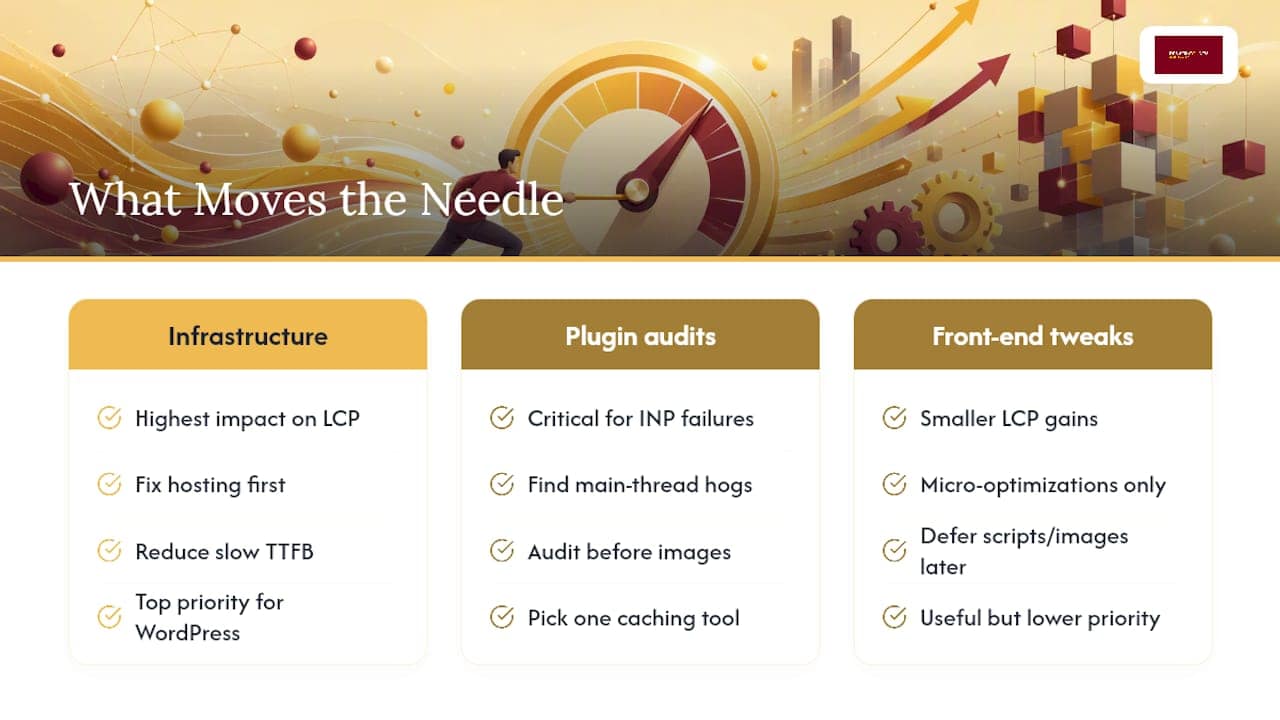
The second gap in conventional advice is treating INP as an afterthought. It replaced FID for a reason. It exposes the accumulated weight of every script running after your page first loads, not just the first click. Sites that pass LCP but fail INP usually have a plugin or embed quietly hogging the main thread.
For WordPress owners specifically, the platform gets blamed for problems that are really implementation problems. Fix hosting, pick one caching tool, and audit plugins before you touch a single image. That order gets you most of the way there.
— Luis
Sources
FAQ
What are the Core Web Vitals?
They’re three Google metrics measuring load speed (LCP), responsiveness (INP), and visual stability (CLS), each scored at the 75th percentile of real visitor traffic.
Are Core Web Vitals still relevant?
Yes. Google still uses them as a page experience signal and a ranking tiebreaker, and INP’s 2024 rollout shows the metrics are actively evolving rather than fading out.
What is considered a good Core Web Vitals score?
A good score means LCP at 2.5 seconds or faster, INP at 200 milliseconds or faster, and CLS at 0.1 or lower, all at the 75th percentile.
How do I pass a Core Web Vitals assessment?
Fix server response time and hosting first, prioritize your LCP resource with preloading, set explicit image dimensions, and defer non-essential JavaScript, then confirm the gains in Search Console’s field data over several weeks.



