
Claim and verify your primary listing, document every duplicate you find, and request a merge or removal through the platform’s official process. Prefer a merge whenever the duplicate holds reviews or citations, since those signals feed your search rankings. Never delete a listing you’re not certain is the duplicate; verified profiles are hard to restore once they’re gone.
TL;DR:
- Merging listings with reviews or history preserves valuable social proof, whereas deleting empty or outdated duplicates prevents unnecessary loss of data.
- Platform-specific processes vary, with Google requiring proof of ownership for merging or removal, while Facebook, Yelp, Airbnb, eBay, and Apple Maps each have their own procedures.
- Regular audits and standardization of business name, address, and phone number across all directories are essential to prevent recurring duplicates.
- Automated monitoring, screenshot documentation, and timely follow-ups help maintain clean profiles and avoid duplicates reappearing after removal.
- External services like Denver County Web Design offer ongoing duplicate management, including scanning, claiming, merging, and reporting, saving business owners time and effort.
Table of Contents
- How to Start Your Duplicate Listing Cleanup Today
- Why Duplicate Listings Keep Showing Up
- How Do You Remove a Duplicate Google Business Profile?
- Removing Duplicates on Facebook, Yelp, Airbnb, eBay, and Apple Maps
- When to Merge, Delete, Claim, or Escalate
- Keeping Duplicates From Coming Back
- How Denver County Web Design Handles Duplicate Cleanup for Local Clients
- What Actually Matters When You’re Cleaning Up Duplicates
- Let Denver County Web Design Handle Your Duplicate Cleanup
- Sources
- FAQ
How to Start Your Duplicate Listing Cleanup Today
The first hour of any duplicate listing removal effort should be about gathering facts, not clicking delete buttons. You need a clear picture before you touch anything, because one wrong removal request can wipe out reviews you spent years earning.
- Search every major platform — Google Maps, Facebook, Yelp, Apple Maps, and any marketplace where your business appears. Save the URL and a screenshot of each listing you find.
- Log the details for each duplicate: listing ID or profile URL, phone number, address format, and review count. This tells you which one to keep.
- Claim or verify any listing you actually control. For listings you don’t control, use the platform’s “suggest an edit” tool or its duplicate-report form instead.
- Choose your action: request a merge if the duplicate carries reviews or history, or request deletion if it’s empty and inaccurate.
- Set a follow-up reminder for 7 to 21 days out, since most platforms resolve these requests within that window, according to FirstSiteGuide.
Pro Tip: Screenshot everything before you submit a request. Support teams frequently ask for proof of duplication, and a dated screenshot moves your case along faster than a written description.
Why Duplicate Listings Keep Showing Up
Duplicates rarely appear because you did something wrong. They’re usually the result of systems talking past each other, and knowing which type you’re dealing with tells you which removal path to take.
- Aggregator and scraper duplicates: data brokers like Data Axle or Foursquare pull your business info and republish it without checking for existing entries, then resyndicate it to smaller directories.
- Employee or former-owner duplicates: someone on your team, a past owner, or a hired agency created a second profile without realizing one already existed.
- Old-location ghosts: you moved or rebranded, and the previous address kept its own listing instead of updating.
- Channel-manager mapping errors: on platforms like Airbnb, choosing “Import” instead of “Map” during a reconnect creates a brand-new listing rather than linking to your existing one, a mistake Hostaway’s support documentation flags as a common root cause.
A practical audit covers Google Business Profile, Apple Business Connect, Yelp, Bing, Facebook, and industry-specific directories, since duplicates hide in more places than most owners expect.
How Do You Remove a Duplicate Google Business Profile?
Google is where most small business owners hit duplicates first, and it’s also the platform with the clearest rulebook. You can have only one Business Profile per business location. Google treats a second profile as a policy violation, and a listing flagged as a duplicate won’t show up on Search or Maps at all, according to Google’s own support documentation.
Start by searching your business name, phone number, and address together, then check the listing’s unique ID if you can find it. From there, your path depends on ownership:
- You own both listings: merge them, or delete the one with less history.
- You don’t own the duplicate: use “Suggest an edit” or file a report through Google Business Profile support.
- The duplicate is an old location: mark it permanently closed, then verify the new listing carries your current information.
When requesting a merge, include both listing IDs and proof they represent the same physical business, like a utility bill or lease. Google’s own guidance carries a serious warning here: removing the wrong profile deletes all its content and every linked manager along with it, so double-check which listing is the duplicate before you submit anything.
Processing typically takes 7 to 21 days. After that window, confirm the surviving listing shows the consolidated review count, matching name/address/phone details, and that it’s still indexed in Maps search results.
Removing Duplicates on Facebook, Yelp, Airbnb, eBay, and Apple Maps
Each platform runs its own removal process, and none of them mirror Google’s flow exactly. Here’s what actually works on each one.
- Facebook: Claim the page through Business Manager if you don’t already own it, or report the duplicate directly from the page’s “About” section. Business Manager also handles merge requests when both pages have activity worth preserving.
- Yelp: File a duplicate report through Yelp’s business support form and attach documentation like a business license or utility bill. Yelp’s review process tends to run longer than Google’s, so build in extra patience.
- Airbnb/Hostaway: If a channel manager import created the duplicate, unmap the incorrect listing, delete it inside your property management system, then remap the original. When standard support can’t resolve a recurring duplicate, escalate to a dedicated trust and safety team, a step Airbnb’s own community discussions confirm is sometimes necessary for stubborn cases.
- eBay and other marketplaces: Remove duplicate product listings through your seller dashboard, or contact marketplace support if the duplicate was created by another seller reselling your catalog.
- Apple Maps/Business Connect: Report the duplicate directly through Business Connect. Aggregator-fed duplicates on Apple Maps can take longer to clear since Apple pulls data from multiple third-party sources.
When to Merge, Delete, Claim, or Escalate
Choosing the wrong action wastes weeks and sometimes costs you reviews you can never get back. Use these four rules to decide fast.
- Merge when the duplicate holds reviews, citations, or steady traffic. Merging folds that history into your primary listing instead of erasing it.
- Delete only when the duplicate is empty, inaccurate, and has no reviews attached. There’s nothing worth preserving there.
- Claim and verify an unowned duplicate first if you need control over it before you can request its removal or merger.
- Escalate when a duplicate is protected under someone else’s verified account, or when it keeps reappearing after you’ve already removed it once.
Pro Tip: If you’re unsure whether a duplicate has reviews attached, check before you submit a deletion request. A quick search of the listing ID by name usually surfaces cached review counts, even on a duplicate flagged as suspended.
Keeping Duplicates From Coming Back
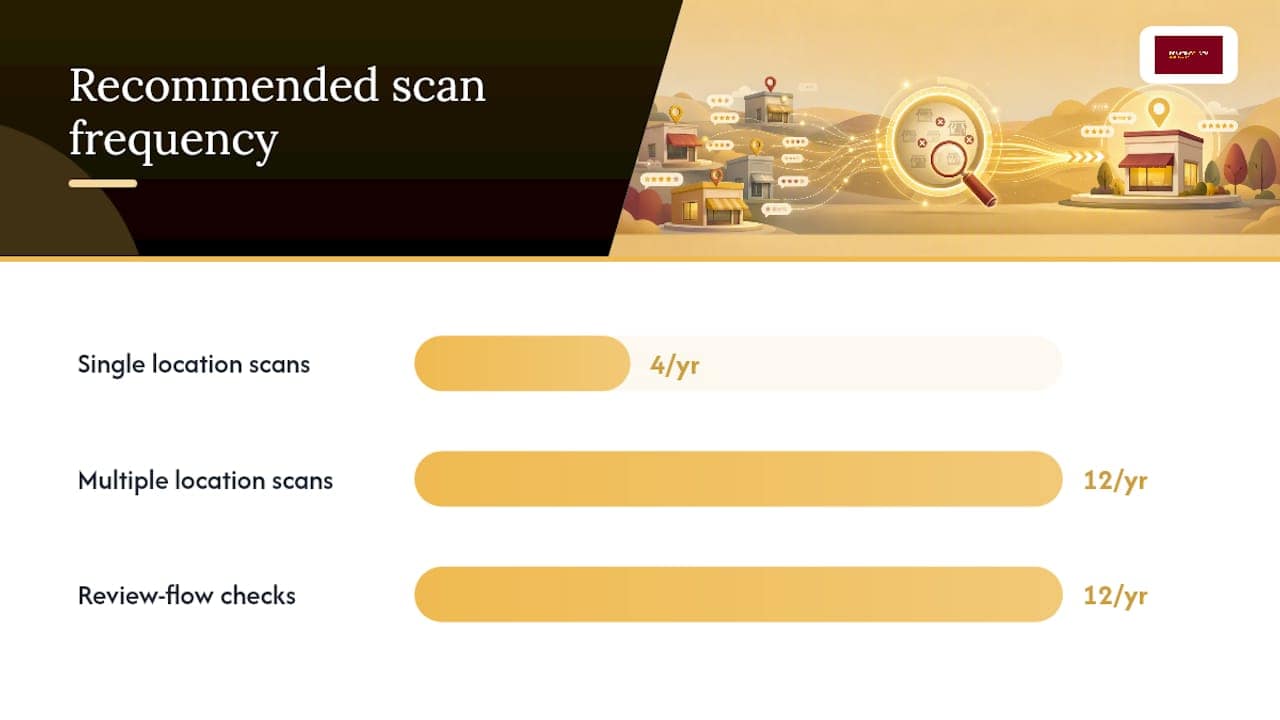
Removing a duplicate once doesn’t mean it’s gone for good. Aggregators resyndicate data on their own schedules, and if the source feed still has your old information, the duplicate can resurface months later.
Run a scan quarterly if you have a single location, or monthly if you manage several. Standardize how your name, address, and phone number appear everywhere, then push that exact format to your data feeds and directories so aggregators stop pulling outdated versions.
- Standardize NAP formatting across every platform you appear on.
- Use suppression tools, like Yext’s duplicate suppression feature, if you manage multiple locations or lack time for manual checks.
- Track review flow monthly. A sudden drop can mean reviews got split across a new duplicate.
- Set alerts so resurfacing duplicates get caught before they accumulate their own review history.
Automated monthly scans matter because aggregator re-pushes and scraped data recreate duplicates whenever the original source feed stays uncorrected, a pattern Yext’s documentation on suppression workflows makes clear.
How Denver County Web Design Handles Duplicate Cleanup for Local Clients
Cleaning up duplicate listings is rarely a one-time task, and that’s exactly why it sits inside Denver County Web Design’s local SEO packages rather than being treated as a side project. The process covers Google Business Profile management, citation cleanup across directories, and NAP standardization so your business name, address, and phone number match everywhere search engines look.
Some clients have seen organic traffic climb significantly within 90 days after focusing on getting the fundamentals right, including a clean, duplicate-free listing footprint.
Luis, who oversees the local SEO strategy behind this approach, treats duplicate cleanup as foundational work rather than an afterthought. Case studies specific to duplicate remediation projects will be added here as they become available.
What Actually Matters When You’re Cleaning Up Duplicates
Most advice on duplicate listing removal focuses on the mechanics: click here, fill this form, wait this many days. What it skips is the judgment call that matters more than any button press. The instinct to delete fast is usually wrong. A duplicate sitting quietly with three years of reviews attached is worth more to your rankings than a “clean” profile with zero history, and plenty of business owners learn that lesson only after they’ve already hit delete.

The conventional wisdom also underrates how often duplicates come back. Treating removal as a single event instead of a repeating task is the most common mistake I see. Aggregator feeds don’t stop feeding bad data just because you fixed one listing, so the businesses that stay clean are the ones that scan quarterly, not the ones that scanned once and moved on.
If you take one thing from this playbook, prioritize documentation before action. Screenshots, listing IDs, and review counts turn a guessing game into a defensible request, whether you’re handling it yourself or handing it to a team that manages this for a living.
— Luis
Let Denver County Web Design Handle Your Duplicate Cleanup
Denver County Web Design is the alternative to spending your weekends hunting through Google, Yelp, and Facebook support forms trying to figure out which listing to merge. For Colorado contractors and home service businesses, the managed version means an audit, a claim and merge or suppress phase, and ongoing monitoring, without you having to learn five different platforms’ removal policies.

The process starts with a full scan across Google Business Profile, Apple Maps, Facebook, Yelp, and industry directories to flag duplicates tied to a business. From there, claim, merge, or removal requests are handled directly, followed by ongoing monitoring to prevent duplicate reappearance. Clients receive a clear summary of findings, fixes, and future expectations, provided within local SEO packages designed for home service businesses.
Request a free Google Business Profile audit to see exactly which duplicates are affecting your visibility right now.
Sources
- Resolve duplicate profiles & ownership issues – Google Business Profile Help
- Suppress duplicate listings – Yext Help
- Airbnb: Duplicate Listings – Hostaway support
FAQ
Why Does Facebook Marketplace Say I Have a Duplicate Listing?
Facebook flags a listing as a duplicate when its algorithm detects matching details, like the same photos, title, or price, posted more than once, often because a listing was accidentally reposted or synced twice through a third-party tool.
What Does It Mean When a Listing Says “Removed”?
A listing marked “removed” has been taken down by the platform, either because you or another manager deleted it, or because it violated duplicate or accuracy policies; on Google specifically, removing a duplicate profile also removes all its content and linked managers.
How Do I Remove a Duplicate Listing on eBay?
Log into your seller dashboard, locate the duplicate product listing, and delete or end it directly; if another seller created the duplicate using your catalog information, contact eBay support with proof of ownership instead.
What Is a Duplicate Listing?
A duplicate listing is a second profile or product page representing the same business, location, or item that already has an official listing elsewhere on the same platform, and it typically needs to be merged or removed to avoid splitting reviews and search visibility.



