
Use stable, human-readable, hyphenated, lowercase URLs served over HTTPS. That single habit improves crawlability, builds user trust, and saves you from painful migrations later. The rest of this guide covers a small handful of conventions worth adopting now: descriptive slugs, a shallow folder hierarchy, minimal parameters, and one consistent canonical host. Get those right and you will rarely think about URLs again.
TL;DR:
- Using stable, human-readable URLs with descriptive slugs improves crawlability, user trust, and long-term site stability, especially when combined with consistent HTTPS and host policies.
- URL paths should be shallow, logical, hyphenated, and lowercase to maximize SEO value and prevent duplicate content issues caused by case sensitivity or inconsistent folder depths.
- Minimizing query parameters and properly canonicalizing filtered or sorted pages prevent duplicate content and crawling inefficiencies, with canonical tags guiding search engines to the main version.
- Correct redirect rules, URL mapping, and monitoring are essential when changing URL structures, as improper redirects cause ranking loss and crawl errors; plan these before making changes live.
- Establishing clear, consistent URL conventions before launch and enforcing them at the server level avoids costly revisions and ensures stable SEO signals for local service pages.
Table of Contents
- What Are the Parts of a URL, and Which Ones Affect SEO?
- URL Structure Best Practices Every Site Should Follow
- What URL Problems Break Crawling, and How Do You Fix Them?
- How Do You Change URLs Without Losing Your Rankings?
- Pre-Publish URL Checklist
- What Denver County Web Design Has Learned Building Local Service Pages
- Why Most URL Advice Overcomplicates a Simple Problem
- Get Your URL Structure Fixed Without a Redesign Retainer
- Where to Verify These URL Rules Yourself
- Sources
- FAQ
What Are the Parts of a URL, and Which Ones Affect SEO?
Every web address is built from the same set of components, and understanding them helps you see why some parts matter to search engines and others are just plumbing.
A URL breaks down into the scheme (https://), the host (denvercountywebdesign.com or a subdomain like blog.example.com), the path (/services/gutter-repair), the slug (gutter-repair, the final readable segment), query parameters (?sort=price&color=red), and an optional fragment (#pricing) that points to a spot on the same page. RFC 3986 defines this syntax, and it’s the reason browsers and crawlers agree on how to read an address without confusion.
Here’s what each piece does for you:
- Scheme and host establish trust and identity. Google treats HTTP and HTTPS versions of a page as separate URLs, so an inconsistent scheme fragments your ranking signals.
- Path and slug are your biggest SEO lever. They’re the part users read in search results and the part you control most directly.
- Query parameters usually identify a variation of the same content (a filter, a tracking tag) rather than new content, which is why they need careful handling.
- Fragments should never carry content that changes what a page is about. Search engines generally ignore what’s after the # when indexing.
Any character outside the standard set (spaces, accented letters, symbols) needs percent-encoding, a conversion process MDN’s documentation explains in detail. A space becomes %20, an accented “é” becomes %C3%A9. You rarely type these by hand, but your content management system generates them constantly, and a broken encoding routine is a common source of 404 errors on multilingual sites.
URL Structure Best Practices Every Site Should Follow
Good URL structure isn’t about clever formatting. It’s about predictability, both for the person clicking a link and the crawler trying to understand your site.
1. Write slugs that describe the page in three to six words. A slug like /denver-gutter-cleaning tells a reader and a search engine exactly what they’re about to see. A slug like /p?id=48291 tells them nothing. Google’s own crawling guidance recommends descriptive, human-readable paths for exactly this reason: they’re easier to crawl, easier to share, and easier to trust.
2. Use hyphens, not underscores, and force lowercase everywhere. Search engines parse a hyphen as a space between two words, but they read an underscore as a character that glues words together. gutter_cleaning can get interpreted as a single token; gutter-cleaning reads as “gutter cleaning.” Since URLs are case sensitive, /Denver-Gutters and /denver-gutters can register as two separate pages, splitting your traffic and creating duplicate content nobody intended.
3. Keep your folder depth shallow and logical. A pattern like /services/plumbing/drain-cleaning makes sense to a visitor and a crawler alike, because each level narrows the topic. Five or six nested folders to reach a single page usually means the hierarchy needs flattening, not more categories.
4. Minimize query parameters and lean on canonical tags. If a filtered or sorted version of a page needs to exist for users, add a rel="canonical" tag pointing back to the primary URL so search engines don’t treat it as separate content.

5. Pick HTTPS, one host (www or non-www), and one trailing-slash policy, then 301-redirect every other variant to it. This decision should get made once and enforced everywhere, not left to chance across different templates or plugins.
Pro Tip: Decide your www vs. non-www and trailing-slash rules before you launch a site, not after. Retrofitting a canonical policy across thousands of indexed pages is a much bigger project than setting it correctly on day one.
What URL Problems Break Crawling, and How Do You Fix Them?
Most URL issues fall into a small set of repeat offenders, and each one has a specific fix rather than a vague “clean it up” gesture.
- Parameter bloat. Filters, sort orders, and session tracking can multiply a single product page into hundreds of near-duplicate URLs. Faceted navigation is a classic culprit here, and Google’s parameter handling guidance recommends canonicalizing to the primary version or blocking non-content-changing parameters through robots rules rather than letting crawlers wander into infinite combinations.
- Mixed trailing slashes and host variants. If /page and /page/ both return content, or http://, https://, www, and non-www versions all load without redirecting, you’re splitting authority across duplicates. A single 301 redirect rule at the server level solves this permanently.
- Uppercase letters and session IDs in the path. Since URLs are case sensitive, enforce lowercase at the server or application layer. Strip session identifiers and numeric-only slugs (/product/48291) in favor of descriptive text.
- Redirect chains. A URL that redirects to a redirect to a redirect wastes crawl budget and slows page load. Point every old URL directly at its final destination.
- Broken relative links. Templates that use parent-relative paths (…/…/page) can generate malformed URLs when content moves. MDN’s guidance on resolving relative references is worth reviewing if your CMS builds links dynamically. Root-relative or absolute links avoid the problem entirely.
Unchecked tracking parameters from ad campaigns and email tools are a frequent, avoidable cause of this kind of bloat, as MarTech’s analysis of URL parameters points out.
How Do You Change URLs Without Losing Your Rankings?
Changing a URL structure is one of the riskiest moves you can make on a live site, but a methodical process keeps the risk low.
- Map every old URL to its new destination before touching anything. Export your full URL list and check for collisions, cases where two old paths would map to the same new one.
- Set up 301 redirects and test them before the new URLs go live. A permanent redirect passes ranking signals to the new address; a temporary (302) redirect does not. Point redirects directly at final destinations to avoid chains.
- Update internal links across the site, not just the navigation menu. Old paths buried in blog posts, footers, or old sitemaps will keep sending users and crawlers to redirected pages unless you fix them at the source.
- Refresh your sitemap and resubmit it, then update canonical tags to reference the new URLs everywhere they appear.
- Monitor Search Console for coverage errors, crawl anomalies, and traffic dips for several weeks after the switch. Most disruption shows up in the first two weeks; a clean migration should recover within a month.
A consistent permalink policy set before launch prevents most of this work from ever becoming necessary.
Pre-Publish URL Checklist
Run through this list before you publish a new page, or use it as an audit framework for an existing site:
- Slug is three to six words, descriptive, lowercase, hyphenated, and free of stop words like “the” or “and”
- Trailing-slash, www/non-www, and HTTPS policy is set at the server level with 301s covering every variant
- Tracking and session parameters are stripped or canonicalized, not left to multiply
- Internal links point to the final URL, not to a redirected one
- Sitemap is current and submitted, and Search Console shows no new coverage errors
Google’s own URL structure documentation frames nearly all of this checklist as baseline crawlability, not an advanced tactic. That’s worth remembering when a URL debate threatens to eat an afternoon: the goal is consistency, not cleverness.
What Denver County Web Design Has Learned Building Local Service Pages
Luis leads content strategy at Denver County Web Design, where the daily work is building websites for plumbers, electricians, and contractors across Colorado. Service and location pages live or die by stable, descriptive slugs. A plumber’s page at /denver-drain-cleaning outperforms a generic /services?id=12 not because of a ranking trick, but because the URL matches what a homeowner actually searches and what Google Business Profile listings reference consistently. Once a client’s site settles on a clean permalink structure, crawl coverage stabilizes and lead forms tied to those pages start converting at a more predictable rate.
Why Most URL Advice Overcomplicates a Simple Problem
Search Engine Land’s own reporting makes a point worth repeating: keywords in a URL are a small signal, not a ranking lever you can lean on once your page is indexed and crawled. A lot of advice online treats slug optimization like a competitive sport, stuffing five keywords into a path that should hold two or three words at most. That’s backwards. The URL’s job is to be legible and stable, not to carry your entire keyword strategy on its back.
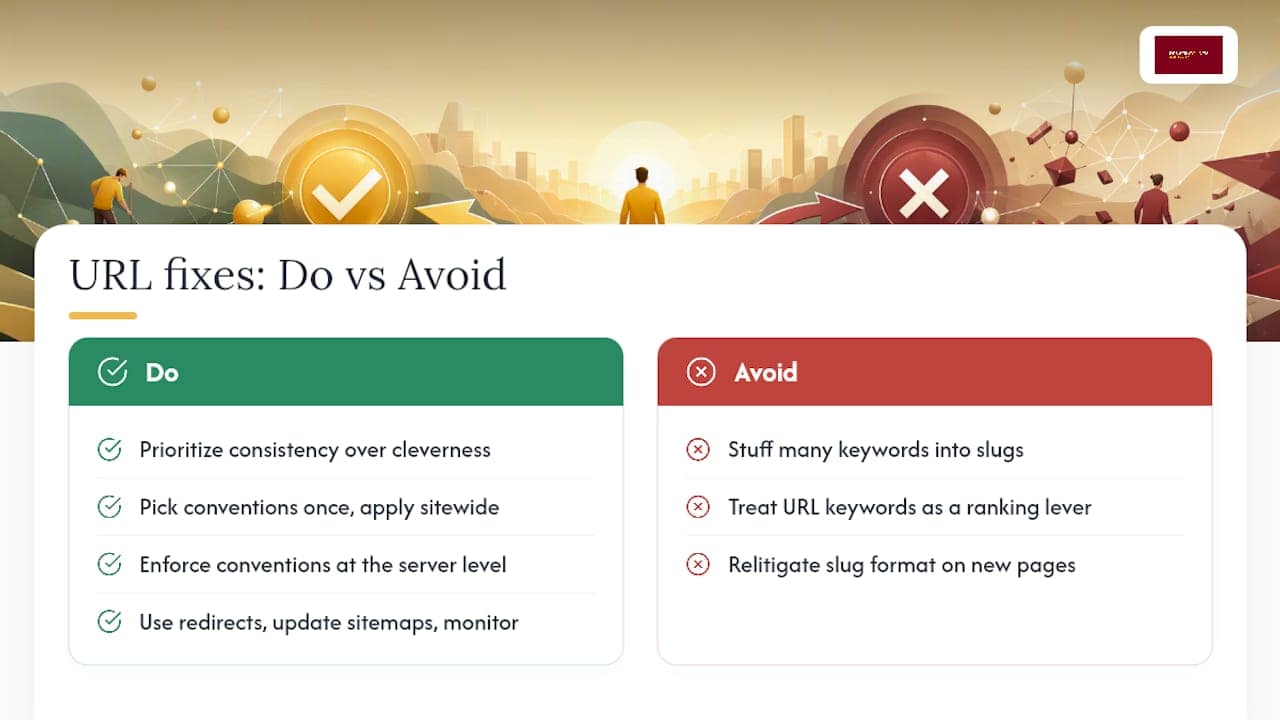
Where the conventional advice actually falls short is timing. Most guides tell you what a good URL looks like but skip the part where you already have ten thousand indexed pages with the wrong structure. That’s the harder problem, and it’s the one covered here: redirect discipline, sitemap updates, and patience during the monitoring window matter more than any slug wording debate.
If you take one thing from this guide, prioritize consistency over cleverness. Pick your conventions once, enforce them at the server level, and stop relitigating slug format on every new page.
— Luis
Get Your URL Structure Fixed Without a Redesign Retainer
There are agencies that offer fixed-scope audits and rebuilds for URL and site-structure cleanup, allowing clients to own the finished site outright without ongoing monthly fees. For contractors juggling service and location pages across multiple cities, a messy permalink history usually means stalled leads and confused Google Business Profile matching, not just an aesthetic problem.

The process starts with an audit of your current URLs, a mapping plan for anything that needs to change, properly implemented 301 redirects, and post-launch monitoring so nothing drops out of the index. If your site needs the kind of structural rebuild this article describes, the WordPress Web Design service builds permalink policy into the project from day one, and the local SEO packages starting with Maps Foundation at $500 per month keep your location pages consistent as you add service areas. Reach out through the Denver County Web Design site to get a scoped quote on your redesign or audit.
Where to Verify These URL Rules Yourself
For the primary documentation behind every rule in this guide, start with Google’s URL structure guidance and RFC 3986 for URI syntax. MDN’s percent-encoding reference covers character encoding in depth, and Search Engine Land’s analysis is a useful check against outdated myths about URL length and keyword density.
Sources
- URL structure best practices for Google Search
- RFC 3986: Uniform Resource Identifier (URI): Generic Syntax
FAQ
What Are the Five Main Parts of a URL?
A URL is made up of the scheme (https://), the host (the domain name), the path (the folders and slug), query parameters (data after a ?), and an optional fragment (an anchor after a #). Each part serves a different function, but the path and slug carry the most weight for readability and SEO, as described in RFC 3986.
What Is the 80/20 Rule in SEO as It Applies to URLs?
Applied to URL structure, the idea means most of your SEO benefit comes from a small set of habits: descriptive slugs, HTTPS, lowercase, hyphens, and one consistent host policy. Chasing marginal gains like exact keyword placement matters far less than getting these foundational conventions right and applying them consistently.
What Is a URL in the Context of SEO?
A URL is the address that identifies a specific page, and in SEO it functions as both a technical identifier for crawlers and a readability cue for users deciding whether to click a search result. Google’s guidance treats a clear, human-readable URL as part of baseline crawlability rather than an optional enhancement.
Can You Give an Example of Good URL Structure?
A strong example is https://example.com/services/gutter-cleaning, which uses HTTPS, a shallow two-level path, lowercase letters, and a hyphenated slug describing the page’s content. Compare that to a poor version like https://example.com/Services/ID=48291?sess=xj29, which mixes case, buries meaning behind a numeric ID, and carries an unnecessary session parameter.
Does Denver County Web Design Handle URL Migrations?
Yes, URL audits and migrations are part of the WordPress web design and local SEO work Denver County Web Design does for home service businesses, covering the redirect mapping, sitemap updates, and monitoring this guide describes. Current pricing for services like The Solo Operator, The Lead Machine, and The Market Owner is listed on the company’s site.



