
An SEO audit identifies the technical and content problems blocking your search visibility, then turns those findings into prioritized fixes that grow traffic and conversions. Modern audits go further, checking whether AI tools like ChatGPT and Google’s AI Overviews can find and cite your business. If your site hasn’t had one in the last six months, you’re likely leaving jobs on the table.
TL;DR:
- An SEO audit reveals critical technical, content, backlink, and AI visibility issues that can hinder search rankings and traffic growth.
- Regular audits help recover lost traffic faster, improve conversion rates, and reduce unnecessary ad spending by fixing foundational problems.
- The most impactful fixes are often quick technical corrections like indexing errors and metadata updates on high-traffic pages, addressed within 30 days.
- Audit frequency should match site activity, with quarterly for active sites, biannual for stable ones, and immediate checks after major website changes or traffic drops.
- Costs vary depending on site size and scope, with smaller sites taking a few hours to a few days, while larger e-commerce sites require several weeks for a comprehensive review.
Table of Contents
- Why You Need an SEO Audit: What It Actually Checks
- What Businesses Actually Gain From an SEO Audit
- When Should You Run an SEO Audit?
- How to Conduct an SEO Audit: A Step-by-Step Checklist
- Which Tools Reveal What During an Audit
- How to Prioritize Audit Findings Into a Roadmap
- How Long Does an SEO Audit Take and What Does It Cost?
- Our Approach: Evidence Behind the Audit Process
- E-commerce Audits vs. Blog and Service-Site Audits
- Where an SEO Audit Fits in Your Marketing Strategy
- Why We Run Audits This Way
- Get a Free SEO Audit Built for Home-Service Businesses
- Sources
- FAQ
Why You Need an SEO Audit: What It Actually Checks
You can’t fix what you haven’t found. An SEO audit is a structured review of your site’s technical health, content quality, backlinks, and search visibility that converts a pile of raw data into a prioritized action plan. Think of it as a home inspection, but instead of checking your foundation and wiring, it checks whether Google (and increasingly, AI search tools) can find, understand, and trust your website.
There are five pillars every serious audit covers, and each one catches a different kind of leak.
Technical health looks at whether your pages can even be crawled and indexed. This means checking your sitemap.xml, robots.txt file, redirect chains, and how many pages Google has actually indexed versus how many you have live. A common find here: a contractor’s site with multiple service pages, but only some indexed because a redesign three years ago left orphaned URLs with no internal links pointing to them.
Performance and user experience covers Core Web Vitals, mobile rendering, and basic accessibility. Since mobile devices generate a large share of website traffic, a slow-loading hero image on mobile can quietly cost you a significant portion of your potential leads before anyone reads a word of copy. Accessibility checks, guided by ADA web resources, also matter here since usability issues for some visitors often overlap with the same code problems that slow your site down for everyone.
On-page and content quality examines whether your pages actually answer what people are searching for. A landing page titled “Services” with three sentences of text tells Google (and readers) almost nothing. A specific fix might mean rewriting that page around “emergency plumbing repair” with real detail on response times, service areas, and pricing ranges.
Off-page and authority reviews your backlink profile for both strength and risk. One toxic link from a spam directory won’t sink you, but a pattern of them can suppress rankings across the whole domain.
AI visibility is the newest pillar, and arguably the fastest-moving one. Auditors now check whether AI crawlers can access your content and whether your pages are structured for AI citation, using clear definitions, schema markup, and authoritative signals that generative engines can lift and quote.
Here’s what a typical pillar breakdown looks like when the checks are run:
- Technical: crawlability, XML sitemaps, redirect chains, duplicate content, canonical tags
- Performance/UX: Core Web Vitals (LCP, INP, CLS), mobile rendering, page speed, basic accessibility
- On-page/content: title tags, meta descriptions, header structure, content depth, search intent match
- Off-page/authority: referring domains, anchor text patterns, toxic or spammy links
- AI visibility: schema markup, entity clarity, AI crawler access, citation-readiness of key pages
Miss any one of these pillars and you’re auditing with a blind spot. A site can have flawless code and still lose visibility because its content never answers the question a searcher actually typed.
What Businesses Actually Gain From an SEO Audit
The real payoff isn’t a report. It’s what changes after you act on it.
Traffic recovery tops the list for most businesses that commission an audit reactively. When organic sessions drop and nobody knows why, an audit usually finds the culprit fast: a botched migration, an accidental noindex tag, or a Google algorithm update that hit a specific content type. Fixing indexing and redirect problems often restores lost traffic faster than any amount of new content creation, because you’re recovering rankings you already earned rather than building new ones from scratch.
Higher conversions come from fixing the friction between a visitor landing on your page and actually filling out a form or picking up the phone. Slow load times, confusing navigation, and buried contact information all quietly bleed leads that never show up in a “traffic” report.
Lower wasted ad spend is the benefit most owners underestimate. Every dollar spent on Google Ads to compensate for weak organic visibility is a dollar you wouldn’t need if the underlying pages ranked on their own. An audit shows you exactly which pages could carry their own weight organically, so ad budget goes toward genuine gaps instead of covering for fixable problems.
Resilience and AI-answer visibility round out the list. Google’s algorithm changes several times a year, and businesses that pass regular audits tend to bounce back faster because their foundational signals stay clean. Increasingly, that resilience now extends to AI search: AI visibility requires both technical readiness, meaning crawl access for AI bots, and content structured for citation through schema and clear, authoritative writing.
Mobile matters more than most owners assume. With most web traffic now coming from phones, a mobile UX problem an audit flags isn’t a minor fix. It’s often the single highest-leverage item on the entire list.
A short list of what a completed audit typically hands you:
- A ranked list of technical errors, from critical to cosmetic
- A content gap analysis showing which pages underperform their potential
- A backlink risk assessment flagging anything actively hurting you
- An AI visibility snapshot showing whether your brand shows up in sample AI-generated answers
None of this shows up on a balance sheet directly. But every item on that list maps to either more visits, more conversions, or less wasted spend, which is exactly why the investment pencils out for most home-service businesses within a quarter or two.
When Should You Run an SEO Audit?
The honest answer is: more often than most business owners think, and immediately after certain events regardless of your regular schedule.
For cadence, match the frequency to how much your site changes:
- Quarterly audits suit active sites that publish new content regularly, run ongoing ad campaigns, or operate in competitive local markets where rankings shift often.
- Biannual audits work for stable service-area websites that see occasional updates but no major structural changes.
- Annual audits fit low-change websites, such as a single-location business with a handful of static service pages that rarely gets touched.
Beyond the calendar, certain events should trigger an audit regardless of when the last one happened. A site migration or redesign, a sudden and unexplained traffic drop, a major content push, or a confirmed Google algorithm update all warrant an immediate check. Waiting for your “scheduled” quarterly audit while traffic bleeds out for six weeks costs you far more than the audit itself would.
It also helps to know the difference between a full audit and a mini-audit. A full audit covers all five pillars across your entire site and can take days to weeks depending on scope. A focused mini-audit zeroes in on one problem, like a single service page that stopped ranking, and can be done in under two hours. Denver County Web Design has run 30 to 90 minute HVAC audits that isolate exactly what’s blocking emergency-call landing pages, without touching the rest of the site. Not every problem needs the full treatment, and knowing which one you’re facing saves both time and money.
How to Conduct an SEO Audit: A Step-by-Step Checklist
Whether you’re running this yourself or briefing an agency, order matters. Skipping ahead to content fixes before you’ve confirmed your pages are even indexable wastes effort on work Google might never see.
Step 1: Align the audit to business goals first.
Before touching a single tool, decide what success looks like. Is this about recovering lost traffic, boosting conversions on existing pages, or breaking into a new service area? Audits shaped by specific business goals find more useful problems than a generic site-wide checklist run for its own sake. Identify your five to ten highest-value pages, the ones that actually generate calls or form fills, and make those the priority lens for everything that follows.
Step 2: Run Tier 1 technical checks immediately.
This is the foundation, and it’s non-negotiable. Confirm every priority page is indexed in Google Search Console, check for crawl errors, and trace any redirect chains longer than one hop. A baseline audit checklist covers crawlability, indexability, page speed, on-page SEO, content quality, and backlinks, and technical issues sit at the top because nothing else matters if Google can’t reach the page.
Step 3: Move to Tier 2, performance and UX.
Pull Core Web Vitals scores for your priority pages. Look specifically at Largest Contentful Paint, Interaction to Next Paint, and Cumulative Layout Shift. Flag any mobile rendering issues, since a desktop-perfect page can still break on a phone screen. Note any accessibility gaps that overlap with usability problems for all visitors.
Step 4: Handle Tier 3, content and on-page fixes.
Review titles, meta descriptions, header structure, and whether each page’s content actually matches what searchers are looking for. Look for cannibalization, where two pages compete for the same keyword and split your ranking potential. Consolidate thin, overlapping pages into one stronger page where it makes sense.
Step 5: Assess off-page signals and backlink risk.
Pull your referring domains and scan for spammy or irrelevant links that could be dragging down trust signals. You don’t need to disavow every low-quality link, but you do need to know they exist before deciding whether they’re actually hurting you.
Step 6: Run the AI visibility checks.
Confirm schema markup is present and accurate on key pages, especially LocalBusiness and Service schema for home-service sites (Denver County Web Design covers this in detail in its guide to local business schema). Check whether your brand and services are clearly defined as entities on the page, not buried in vague marketing language. Then sample a handful of real customer questions in ChatGPT or Perplexity and see whether your business shows up at all.
Step 7: Package the findings into a real deliverable.
A completed audit isn’t a spreadsheet of 200 issues dumped on someone’s desk. It’s a prioritized task list with an owner assigned to each item (developer, content writer, or marketing lead) and a realistic estimate of effort for each fix.

Pro Tip: Run your Tier 1 technical checks before you spend a single hour on content rewrites. Fixing an indexing problem can restore traffic within days, while a content rewrite on a page Google can’t even see does nothing until the technical issue is resolved.
Which Tools Reveal What During an Audit
No single tool tells the whole story, which is why every solid audit pulls from several sources and cross-checks them against each other.
- Google Search Console shows you exactly which pages are indexed, which have coverage errors, and what queries actually bring in clicks. This is your ground truth for how Google sees your site right now.
- PageSpeed Insights and Lighthouse measure Core Web Vitals in both real-world and lab conditions, giving you the specific metrics behind slow load times.
- Crawlers like Screaming Frog or Sitebulb scan your entire site structure to surface broken links, duplicate title tags, and orphaned pages that manual browsing would never catch.
- Backlink and referring-domain tools map your link profile, flagging spam patterns and showing which links actually carry authority.
- AI visibility checkers, such as the AI Search Readiness Checker, test how well your content is structured for generative engine citation, supplemented by manually sampling AI tools with real customer questions.
None of these tools replace human judgment. A crawler will tell you a page has thin content, but it takes a person to decide whether that page should be rewritten, merged with another, or deleted outright. The most reliable audits combine automated data pulls with a spreadsheet where a real person reviews context, checks competitor pages, and makes the judgment calls no tool can automate.
How to Prioritize Audit Findings Into a Roadmap
A 40-item audit report is useless if nobody knows what to fix first. The fix is a simple impact-versus-effort matrix: plot every finding on two axes, how much it could move traffic or conversions, and how much work it takes to fix.
- High impact, low effort items go first. This usually means indexing errors, broken redirects, and metadata fixes on high-traffic pages. These often take an afternoon and can produce measurable results within weeks.
- High impact, high effort items go on the roadmap next. Content consolidation projects or a full site restructure fall here. Plan these over a quarter, not a weekend.
- Low impact, low effort items get batched together and knocked out when time allows.
- Low impact, high effort items usually get cut entirely unless a specific business reason justifies them.
Protecting existing traffic comes before chasing new traffic. Resolving an indexing hole on a page that used to rank well typically restores lost sessions faster than publishing five new blog posts. Assign real owners to each fix: a developer handles redirects and schema, a content writer handles metadata and page rewrites, and a marketing lead tracks the whole roadmap against a calendar.
Pro Tip: Set a 30-day check-in after your first round of fixes goes live. Track impressions and click-through rate in Search Console before you wait for full ranking movement, since CTR changes often show up weeks before rankings do.
Measure success across four signals: organic traffic, search impressions, click-through rate, and conversions from organic sessions. If AI visibility was part of the audit, add a fifth: whether your business now appears in sample AI-generated answers for the queries you sampled during Step 6.
How Long Does an SEO Audit Take and What Does It Cost?
Scope drives both time and price more than anything else. A small service-area site with under 20 pages might take a few hours to a couple of days for a thorough review. A medium-sized business site with blog content and multiple service areas usually runs one to three weeks. A large e-commerce site with thousands of product pages can take several weeks, simply because there’s more surface area to check.
Several factors push cost and time up regardless of site size:
- CMS complexity — a custom-built site takes longer to audit than a standard WordPress install with predictable structure.
- Manual content review needs — a site with hundreds of pages requiring individual quality checks costs more than one with a handful of high-value pages.
- Remediation support — a report-only audit costs less than one bundled with actual implementation help.
Deliverable type matters as much as scope. A report-only audit hands you findings and leaves execution to you. A report-plus-implementation package includes the agency actually making the fixes. A managed retainer builds ongoing audits into a continuous improvement cycle. DIY audits make sense for a small, simple site where the owner has time to learn the tools. Hiring outside help makes more sense once the site grows complex enough that misdiagnosing a problem costs more than the audit itself.
Our Approach: Evidence Behind the Audit Process
Denver County Web Design built its audit process around one question: does this fix actually move the needle on leads?
For contractors and home-service businesses in Colorado, that means audits that weigh heavily on local SEO signals and Google Business Profile health, since a plumber or electrician lives or dies by local map visibility more than broad organic rankings. The team also applies the same contractor-specific local SEO practices across service-area pages, checking whether each one actually targets a real neighborhood or city rather than a vague “we serve the metro area” page that ranks for nothing.
Choosing an agency for an audit can get you a scoped review focused on your highest-value pages, a prioritized fix list with clear ownership, and the option to have the team implement the fixes directly instead of handing you a report and walking away.
E-commerce Audits vs. Blog and Service-Site Audits
An e-commerce audit and a home-service business audit chase different problems, even though both run through the same five pillars.
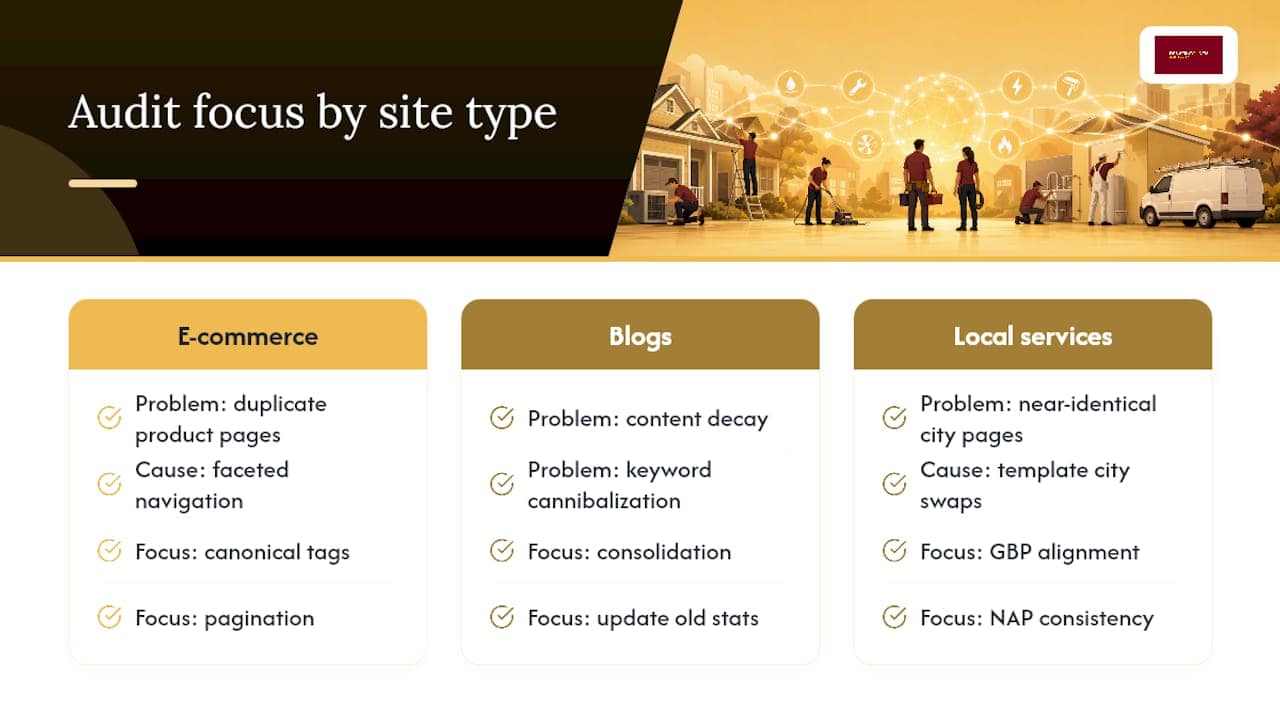
E-commerce sites live and die by faceted navigation, duplicate product content, and out-of-stock page handling. A single product line can generate thousands of near-identical URLs through color and size filters, creating duplicate content problems that dilute rankings across the whole catalog. Audits here spend heavy time on canonical tags, pagination, and whether category pages actually differentiate themselves in the content Google sees.
Blogs and content-heavy sites face a different problem: content decay and cannibalization. Older posts lose rankings as competitors publish fresher content, and multiple posts covering similar ground end up competing against each other for the same search terms. Audits here focus on consolidation, updating outdated statistics, and internal linking structure between related posts.
Local service-area sites, the category most home-service contractors fall into, weight heavily toward Google Business Profile alignment, NAP consistency across directories, and whether service-area pages are distinct enough to rank individually rather than reading as copy-pasted templates with the city name swapped out. A plumbing company with ten near-identical “we serve [city name]” pages often ranks worse than one with three genuinely differentiated pages built around real neighborhood detail.
Knowing which category your site falls into before the audit starts changes where the reviewer spends their time, and it’s why a generic checklist run without that context misses the problems that actually matter for your specific business.
Where an SEO Audit Fits in Your Marketing Strategy
An SEO audit isn’t a standalone technical exercise. It’s the diagnostic step that should inform every other marketing decision you make afterward.
If your audit reveals that certain service pages already rank well but convert poorly, that’s a signal to redirect ad spend away from paid search for those terms and toward retargeting or offer testing instead. If it reveals that whole categories of services have no organic presence at all, that tells you where content investment or Google Ads coverage needs to fill the gap rather than organic growth alone.
The audit also shapes your content calendar. Instead of guessing at blog topics, you’re building content around the specific gaps and cannibalization issues the audit surfaced, which means every piece of content has a defined job to do rather than existing for its own sake.
AI visibility findings increasingly feed into brand strategy too. If your business doesn’t show up when a potential customer asks an AI tool for a recommendation in your service category, that’s not just an SEO problem. It’s a visibility gap that affects how customers discover you before they even reach a search engine. Treating the audit as a one-time technical report, rather than an input into budget allocation, content planning, and brand positioning, wastes most of its actual value.
Why We Run Audits This Way
The biggest mistake I see business owners make is treating an SEO audit like a report card instead of a工作 order. A 60-page PDF listing every technical flaw on a site is interesting, maybe, but it doesn’t book a single job. What matters is whether the three or four fixes at the top of that list actually move the metrics tied to revenue: calls, form fills, and booked appointments.
We measure success the same way after every audit: organic traffic and conversions in the 90 days following implementation, not vanity metrics like total keywords ranked. That’s the only scoreboard that tells a contractor whether the work was worth the invoice.
If you’re not sure whether your site needs a full audit or just a focused look at your busiest pages, that’s worth a conversation before you commit to either.
— Luis
Get a Free SEO Audit Built for Home-Service Businesses
Some agencies offer free audits that skip the 60-page report nobody reads and go straight to what’s actually blocking your leads. It covers indexability, Core Web Vitals, local SEO signals, and whether your business shows up when customers ask AI tools for a recommendation in your service category.

Unlike a generic agency audit that treats every business the same, this one is built around how home-service companies actually generate revenue: phone calls and booked jobs, not raw traffic numbers. The team focuses on quick, high-impact fixes first, so you see movement in weeks rather than waiting months for a full strategy rollout. Some agencies build websites you fully own with no monthly fees, so any fixes that come out of the audit go straight into a site you control.
Request your free SEO audit today and find out exactly what’s standing between your website and your next booked job.
Sources
- SEO audits: How to conduct one that drives traffic growth + checklist
- How to Perform a Complete SEO Audit in 20 Steps
- Share of website traffic coming from mobile devices (Statista)
- How to Do an SEO Audit (AMA)
FAQ
Can ChatGPT Do an SEO Audit?
ChatGPT can help draft checklists, summarize crawl data, or explain technical concepts, but it can’t crawl your live site, pull real Google Search Console data, or run Core Web Vitals tests. Treat it as a research assistant for the process, not a replacement for actual tools and human review.
Can I Do My Own SEO Audit?
Yes, especially for a small site with a handful of pages. Google Search Console and PageSpeed Insights are free, and a basic crawler like Screaming Frog’s limited version covers the technical basics. Larger or more complex sites usually benefit from professional help once the diagnosis requires judgment calls a template can’t make.
How Often Should an SEO Audit Be Performed?
Active sites with regular content updates or competitive local markets should run a full audit quarterly, stable sites biannually, and low-change sites annually. Outside that schedule, run one immediately after a migration, redesign, sudden traffic drop, or confirmed algorithm update.
How Much Do SEO Audits Cost?
Cost scales with site size and scope: a small service-area site might take a few hours to review, while a large e-commerce catalog can take several weeks. Report-only audits cost less than packages that include implementation, and Denver County Web Design offers a free audit for home-service businesses that want a scoped starting point without committing to a full engagement upfront.



