Negative keywords are search terms you tell Google Ads (or Microsoft Ads) not to trigger your ad for, and their whole job is to stop you paying for clicks that never had a shot at converting. Do this first: open your search terms report, sort by cost, and add the obvious offenders (like “jobs,” “free,” or “DIY”) as account level negatives if they’re clearly irrelevant. Three match types control how tightly each negative blocks traffic, and the details matter more than most PPC managers assume.
TL;DR:
- Negative exact match keywords do not automatically block plurals or misspellings, requiring deliberate inclusion of all variants.
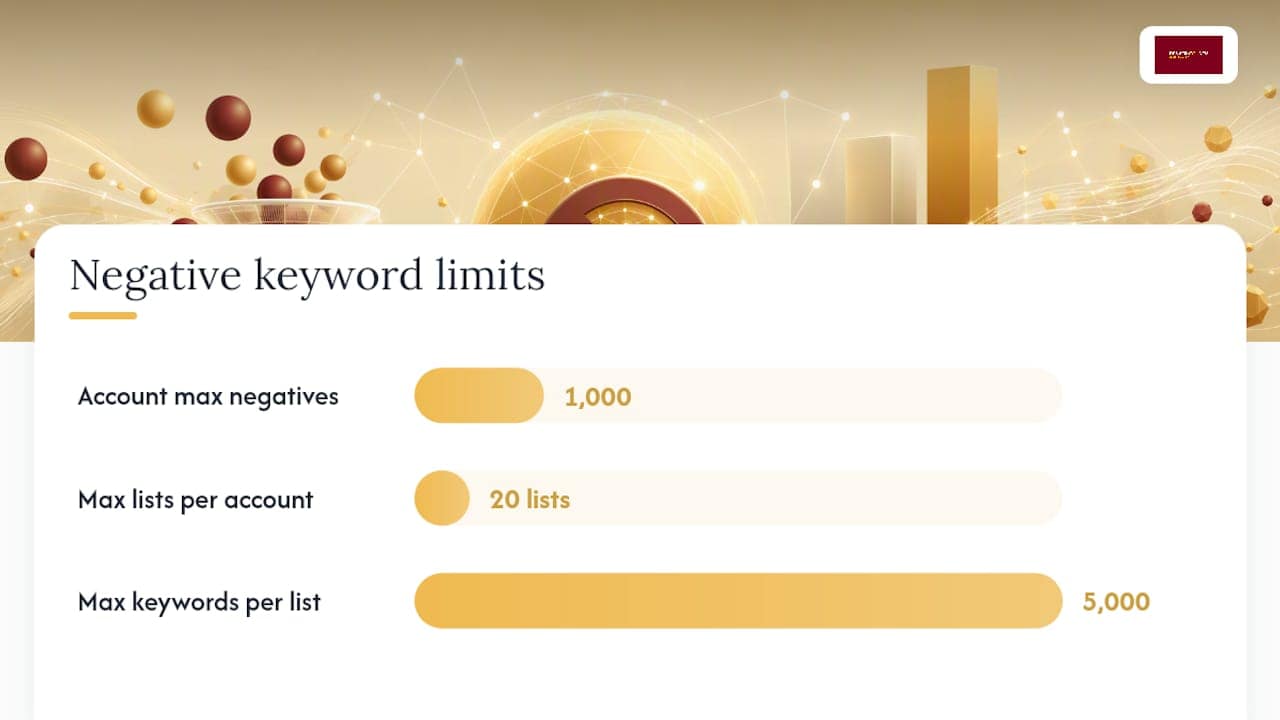
- Negative keywords are most effective when added at the account level or through shared lists, which are limited to 1,000 total keywords and 20 lists per account.
- Regularly reviewing search terms report, especially in high-spend accounts, helps identify irrelevant queries that justify negative keyword additions.
- Overusing broad match negatives can unintentionally block relevant queries, so testing negatives in a single ad group first prevents unintended traffic loss.
- An effective negative keywords strategy should be documented and integrated into ongoing campaign governance, ideally managed by agencies with established review processes.
Table of Contents
- What Is a Negative Keywords Guide Supposed to Teach You First?
- Where to Add Negatives, and the Hard Limits Google Enforces
- How to Find Negative Keywords Worth Adding
- Deciding How Aggressive Your Negative Keywords Strategy Should Be
- Avoiding the Mistakes That Quietly Sabotage Good Accounts
- Starter Negative Keyword Categories You Can Adapt Today
- How Denver County Web Design Handles Negative Keyword Governance for Contractor Clients
- Why Negative Keywords Deserve More Respect in 2026
- Get Help Turning Negative Keywords Into Real Campaign Governance
- Where to Verify the Technical Rules Yourself
- Sources
- FAQ
What Is a Negative Keywords Guide Supposed to Teach You First?
The first thing any real negative keywords guide should teach is how the three match types actually behave, because guessing wrong here wastes budget in both directions. Negative broad, negative phrase, and negative exact each block a different shape of query, and Google Ads documentation confirms they do not work like their positive counterparts.
- Negative broad match blocks any search containing all your negative’s words, in any order. A negative broad keyword of “running shoes” blocks “shoes for running” and “best running shoes” but not “shoe” alone.
- Negative phrase match blocks searches containing your exact phrase, in that word order, with other words allowed around it. Negative phrase “cheap shoes” blocks “cheap shoes for men” but allows “shoes cheap deals.”
- Negative exact match blocks only the identical search string. Negative exact “shoes” blocks “shoes” but not “shoe” or “shoes online.”
Here’s the gotcha that trips up even experienced managers: negative exact match does not automatically catch plurals or misspellings the way a positive keyword’s close-variant matching does. If you add “shoe” as a negative exact, “shoes” can still trigger your ad, so you may need to add both forms deliberately. There’s also a lesser known rule buried in Google’s own documentation: negatives can lose effect once a search query passes the 16th word, meaning extremely long, rambling search strings can technically slip past a negative that would otherwise block them. For most accounts this is a rounding error, but it’s worth knowing before you assume a negative is airtight.
Where to Add Negatives, and the Hard Limits Google Enforces
Negatives live at four levels: ad group, campaign, account, and shared negative keyword lists, and where you place one determines its blast radius. Ad group level negatives fix a problem in one tightly themed group without touching sibling ad groups selling something similar. Campaign level negatives stop irrelevant traffic across an entire campaign, useful when you’re running a “residential” campaign and want to block every commercial query in one move. Account level negatives (available through shared lists) block a term everywhere, which is exactly what you want for universal noise like “jobs” or “salary.”
Shared negative keyword lists, found in the account’s shared library, let you build one exclusion set and apply it to multiple campaigns at once, and edit it centrally when you spot a new offender. Agencies managing several client accounts through a manager account can build and push these lists across accounts, which keeps governance consistent instead of rebuilding the same list five times, according to Google’s guidance on cross-account negative lists.
The numeric ceilings matter for planning at scale:
- 1,000 negative keywords maximum at the account level.
- 20 negative keyword lists maximum per account.
- 5,000 keywords maximum per individual list.
One more platform quirk worth flagging: negative keywords behave less precisely on Display and Video campaigns, where Google treats most exclusions as broad match regardless of how you entered them, and some Smart Display setups handle exclusions differently still. Don’t assume search campaign logic carries over one-to-one.
How to Find Negative Keywords Worth Adding
Finding negatives isn’t guesswork if you follow a repeatable process, and the search terms report is where that process starts every time.
- Pull the search terms report for your account or campaign, filtering by a date range appropriate to spend volume (see the strategy section below for exact windows).
- Sort by cost, then by impressions, to surface terms burning budget before you dig into conversion rate, a step critical to improving your page load speed and digital experience.
- Capture the right columns: impressions, clicks, cost, conversions, conversion value, and landing page, so you can judge relevance and performance in one pass rather than three.
- Cross reference with Keyword Planner to see search volume on candidate negatives before you commit, especially for broad terms that might block more than you expect.
- Check onsite search and analytics data if you run ecommerce, since your own site search box often surfaces intent mismatches (people searching “return policy” or “warranty”) that never show up cleanly in ad platform reports.
- Layer in AI assisted surfacing for accounts with high query volume; a semantic tool or AI review can group thousands of terms into intent clusters faster than manual scanning, though a human still needs to approve the final list.
- Tag each candidate by reason: job seeker, DIY researcher, wrong product, competitor name, or wrong location, then assign the correct scope (ad group, campaign, or shared list) before adding it.
Pro Tip: Export the search terms report weekly for the first month of any new campaign. Ramp period noise is where the most expensive irrelevant clicks hide, and catching it early protects your average CPA before it skews your data.
Deciding How Aggressive Your Negative Keywords Strategy Should Be
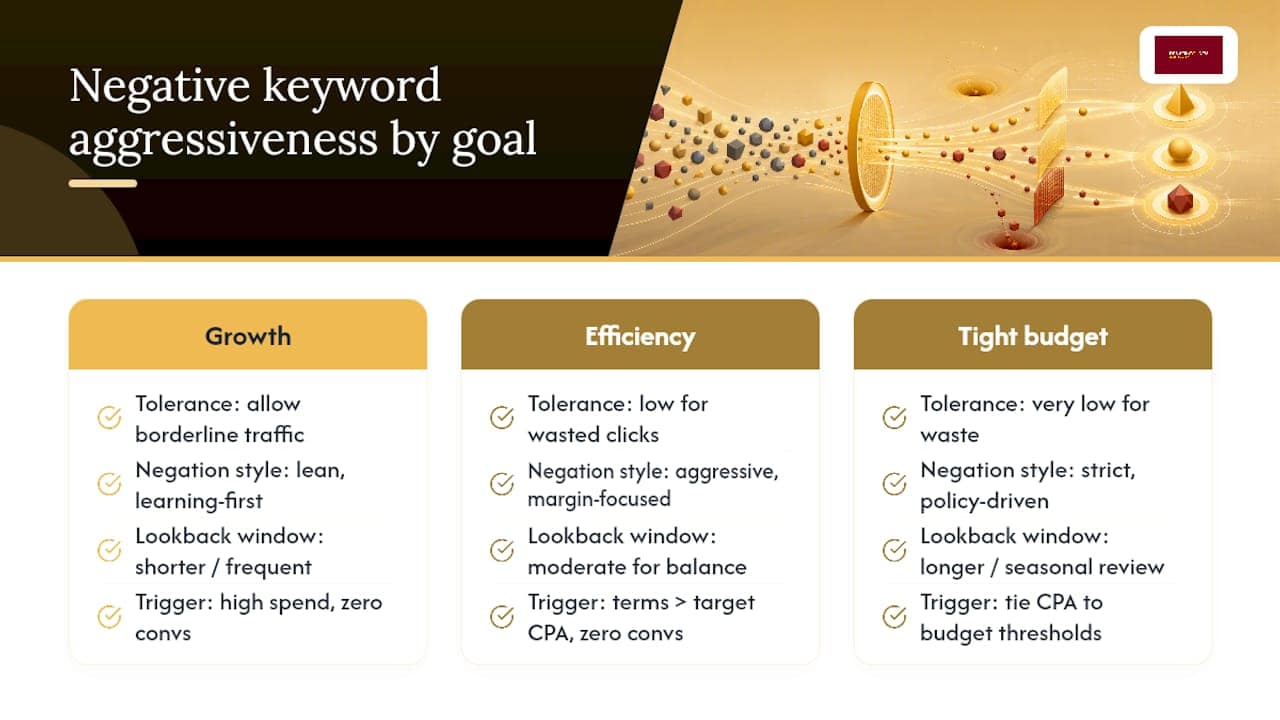
How hard you push negatives depends on whether the account is optimizing for growth, efficiency, or working inside a tight budget, and that decision should be written down, not left to instinct. A growth phase account tolerates more borderline traffic because volume and learning data matter more than shaving the last few dollars of waste. An efficiency phase account, especially one past its learning period, should negate aggressively because every wasted click now directly erodes margin.
Treating negatives as deliberate signal shaping rather than routine housekeeping is one of the clearer shifts in how practitioners approach the tactic in 2026, and that framing changes what “aggressive” even means. It’s not about blocking more, it’s about blocking with intent tied to a goal.
Concrete triggers work better than vague judgment calls, such as flagging search terms that have burned significantly more than your target cost per acquisition with zero conversions over a chosen time window, or terms matching clearly irrelevant categories like job seekers or competitor names, which can be negated immediately regardless of spend.
On time windows: shorter lookbacks suit high-volume accounts making frequent adjustments, moderate windows fit most mid-volume local service accounts balancing data and reaction speed, and longer annual reviews catch seasonal terms that misfire during specific months. Document which window you’re using and why, because that record is what lets a new team member or client understand your reasoning six months later. If your account ties CPA targets to a broader budget conversation, it’s worth revisiting how your Google Ads budget interacts with these thresholds before locking in a policy.
Avoiding the Mistakes That Quietly Sabotage Good Accounts
Over-negation is the single most common way negative keyword strategies backfire, and it’s often invisible until you notice impressions or conversions dropping for reasons that don’t match any obvious cause. A broad match negative added too casually can block queries you actually wanted, since broad negatives cast a wider net than most managers expect.
- Watch for sudden impression drops right after adding a batch of negatives, especially broad match ones, and check whether relevant queries disappeared alongside the irrelevant ones.
- Use Google Ads’ negative keyword conflict warnings, which flag when a negative you’re adding would block a keyword you’re actively bidding on, before you save the change.
- Test in a single ad group first before rolling a new negative out account wide, particularly for anything broad match.
- Run a weekly audit cadence during ramp (the first 30 to 60 days of a new campaign), then step down to biweekly or monthly once performance stabilizes.
- Hold a control group when possible, applying new negatives to half your ad groups and comparing performance against the untouched half, so the impact is measured rather than assumed.
The goal isn’t zero irrelevant clicks. It’s a negative list that removes clear waste without touching the messy, ambiguous queries that sometimes convert anyway.
Starter Negative Keyword Categories You Can Adapt Today
Every account benefits from a baseline exclusion list before you even look at your own search terms report, and building one from these categories saves the first few weeks of obvious waste.
- Job seekers: “jobs,” “salary,” “hiring,” “careers,” “how much do [X] make.”
- DIY and how-to researchers: “how to,” “diy,” “tutorial,” “instructions,” “guide.”
- Free and cheap seekers: “free,” “cheap,” “discount,” “coupon,” unless discounting is actually part of your offer.
- Research and definition queries: “what is,” “meaning,” “definition,” “vs” comparisons if you don’t want to fund top-of-funnel education.
- Wrong product terms: variations that sound close but describe something you don’t sell.
- Competitor names: a policy decision, not a technical one; some advertisers exclude them to save budget, others deliberately target them, so decide intentionally rather than defaulting either way.
- Wrong location terms: city or region names outside your actual service area, critical for any local service business running geo-targeted campaigns.
Local service businesses, ecommerce stores, and B2B accounts all need the same categories tuned differently. A plumber excludes “DIY leak fix,” an ecommerce brand excludes “manual” and “instructions,” and a B2B software account excludes “free trial” if trials aren’t offered. Build the base list once as a shared negative keyword list, then apply campaign specific negatives on top for offer level nuance. Anyone running local campaigns for plumbers or electricians will recognize most of this list immediately, since home service search intent tends to repeat the same noise patterns account after account.
How Denver County Web Design Handles Negative Keyword Governance for Contractor Clients
New Google Ads accounts get an initial search terms sweep before spend ramps meaningfully, and obvious noise (job seekers, DIY searches, out of area queries) goes into a shared negative list applied across every campaign in the account. Weekly reviews continue through the ramp period, tightening as real query data replaces assumptions. Negative list changes get logged and shared with the client before broad application, so nobody is surprised by a sudden shift in traffic volume. The measurable outcome contractors care about isn’t the negative list itself, it’s fewer unqualified calls and a lower cost per booked job once the list matures.
Why Negative Keywords Deserve More Respect in 2026
Negative keywords aren’t cleanup work. They’re how you tell Google’s algorithm what your business actually is, and sloppy exclusions teach it the wrong lesson just as surely as sloppy positive keywords do. Pairing AI assisted discovery with a human sign off step scales this without losing control, and writing down your aggression policy and triggers keeps everyone, including future you, aligned on why a term got blocked.
— Luis
Get Help Turning Negative Keywords Into Real Campaign Governance
Building a negative keyword policy is one thing. Maintaining it every week while also managing bids, budgets, and landing pages is where most in-house marketers run out of hours. Some agencies manage Google Ads campaigns for home service businesses with negative list governance built into the process from day one, not bolted on after the budget’s already been spent chasing job seekers and DIY researchers.

If you’re evaluating agencies for this kind of work, ask pointed questions: how often do they review the search terms report, do they document their negative keyword triggers, and can they show you their shared list structure before signing anything. Some Google Ads services build that governance in from the first campaign launch, alongside local lead generation work suited to contractors, plumbers, electricians, and similar trades. Explore the Google Ads and local growth packages to see how campaign management is structured, or check the local SEO and lead generation plans if you want negative keyword discipline paired with broader visibility work. Reach out through either page to get a look at how your current account’s search terms report compares to what a properly governed list would catch.
Where to Verify the Technical Rules Yourself
Google’s own documentation on negative keywords, adding negatives to campaigns, and cross-account negative lists covers every limit and match-type rule cited above in full detail.
Sources
- About negative keywords – Google Ads Help
- The real strategy behind negative keywords in 2026 – Search Engine Land
FAQ
What Is a Negative Keyword Example?
A negative keyword is a term you exclude so your ad won’t show for it, like adding “free” as a negative so your ad doesn’t trigger for “free plumbing repair” when you charge for service. Match type changes the blast radius: negative phrase “free plumbing” blocks that exact phrase with words around it, while negative exact “free plumbing” blocks only that precise search.
How Do You Make a Negative Keyword List?
Start with the search terms report, export cost and conversion data, and tag every irrelevant term by reason (job seeker, DIY, wrong location) before assigning it to a shared list, campaign, or ad group. Google’s own negative keyword list guidance covers building and applying shared lists across a manager account for consistency.
Should Negative Keywords Be Exact Match?
Not always. Exact match gives you precise control but requires adding every variation, including plurals and misspellings, since negative exact doesn’t automatically catch close variants; phrase or broad negatives cover more ground when you’re confident the pattern is consistently irrelevant.
Where Do You Find the Negative Keyword List in Google Ads?
Negative keyword lists live in the shared library, accessible from the account’s tools and settings menu, where you can create, edit, and apply lists across multiple campaigns at once. Manager accounts can push these lists across multiple client accounts for consistent governance, per Google’s cross-account documentation.
How Much Does Negative Keyword Management Cost With an Agency?
Pricing varies by agency and scope, and Denver County Web Design’s current Google Ads and campaign management pricing is available directly on its website rather than published as a flat rate here.