
Google Maps ranking depends first on relevance, distance, and prominence, and the fastest wins come from three moves: verify your Business Profile, set the right primary category, and get your reviews recent and steady. This guide breaks down each ranking factor and gives you a sequence to follow, starting today and building through the next 90 days.
TL;DR:
- Verifying your Business Profile is crucial, as an unverified listing remains invisible for most ranking signals and limits your visibility.
- Keeping your profile fully complete with accurate categories, consistent NAP details, and relevant attributes significantly improves your relevance and ranking potential.
- Regularly requesting recent reviews from satisfied customers and responding to all reviews boost your prominence and help maintain high ratings.
- Adding fresh photos, videos, and posting biweekly updates enhance user engagement and signal activity, which can positively influence your ranking.
- Monitoring your local rankings with a geo-grid and tracking key profile insights over 90 days enables data-driven adjustments to maximize visibility.
Table of Contents
- Verify and claim your Google Business Profile the right way
- Profile completeness: categories, attributes, and accurate business details
- Reviews and ratings: count, recency, and playing by Google’s rules
- Photos, videos, and Posts: the content Google actually rewards
- The three pillars explained: relevance, distance, and prominence
- Website and web signals: links, on-page relevance, and citations
- Technical signals: structured data and a crawlable business identity
- Local content that matches what searchers actually type
- Monitoring and measurement: tracking rank the way it actually varies
- Practical checklist and 90-day action plan
- Where small service businesses should actually spend their time
- How Denver County Web Design helps you rank on Google Maps
- Sources
- FAQ
Verify and claim your Google Business Profile the right way
Before any optimization matters, Google needs to know you actually own the business you’re claiming. Google’s own guidance says local ranking is based mainly on relevance, distance, and prominence, and prominence starts with a verified, complete profile. An unverified listing is invisible for most of the signals that follow, so this step comes first, not last.
Verification usually happens one of three ways: a postcard mailed to your business address taking a few days, a phone or text code for eligible categories, or instant verification if you’ve already confirmed the business through Google Search Console. Choose whichever method Google offers you. Don’t try to skip it with a workaround.
Once verified, work through this checklist:
- Set your primary category to the single most accurate description of your core service.
- Add your local phone number, not a tracking number or call center line.
- Choose service-area business settings if you don’t have walk-in customers, or storefront settings if you do.
- Set accurate hours, including holiday hours, since stale hours quietly erode trust signals.
- Decide who manages the profile: the owner should retain admin access even if an agency handles day-to-day updates.
Skipping any of these steps leaves ranking eligibility on the table before you’ve touched a single review or backlink.
Profile completeness: categories, attributes, and accurate business details
Once verified, completeness is what makes your profile legible to Google’s relevance engine. A profile with gaps forces Google to guess, and it usually guesses conservatively.
- Pick one primary category that matches your core service exactly, then add secondary categories only for services you genuinely offer, never to catch extra search traffic.
- Keep your name, address, and phone number (NAP) identical across your website, your Business Profile, and every directory listing, right down to abbreviations like “St.” versus “Street.”
- Add service menus and attributes that reflect what a customer actually gets: emergency availability, free estimates, licensing, or veteran-owned status if it applies.
- Write a business description that names your services and service area in plain language, without keyword stuffing.
- Avoid category or name edits that misrepresent your business. Google’s policy guidance warns that significant identity or location changes can be rejected outright.
Consistency matters more than volume here. A profile with five accurate, matching fields will usually outperform one with twenty fields that contradict the website.
Reviews and ratings: count, recency, and playing by Google’s rules
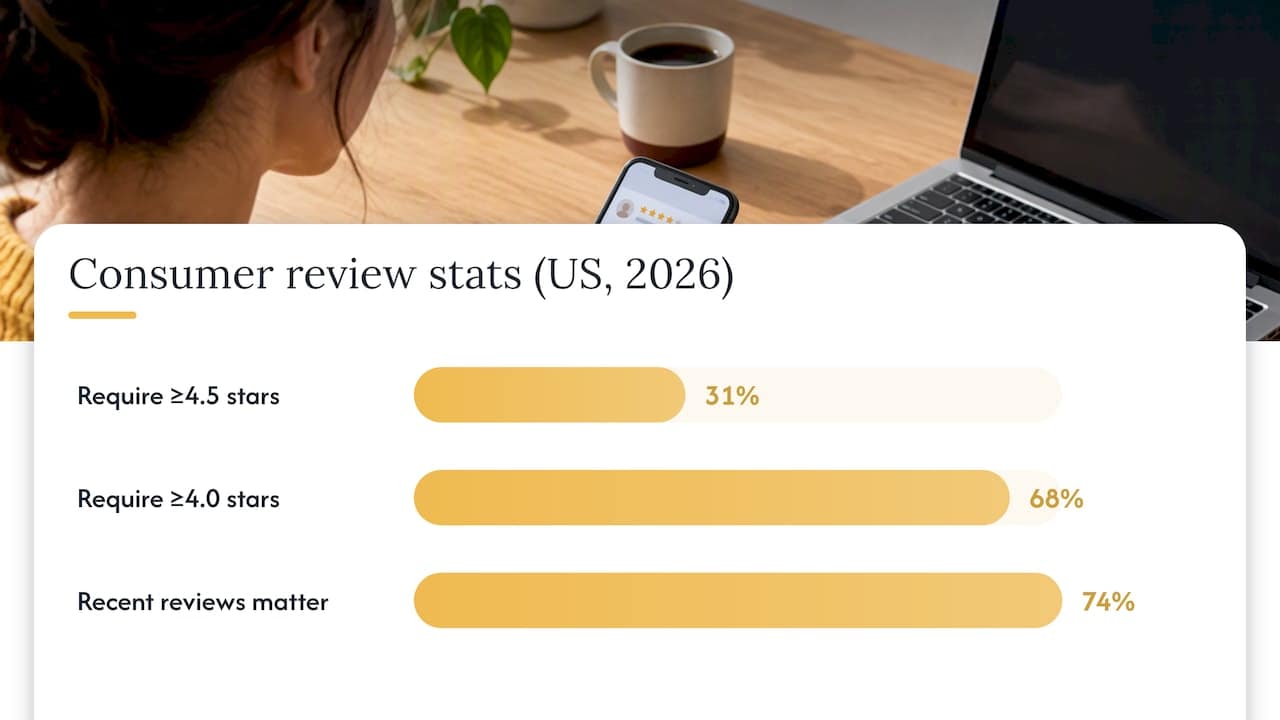
Reviews carry more weight in 2026 than in years past, and recency now matters as much as the overall star average. BrightLocal’s 2026 Local Consumer Review Survey found that 31% of US consumers only use businesses rated 4.5 stars or higher, 68% require at least 4.0 stars, and 74% say reviews from the past three months carry real weight in their decision. A business sitting on old five-star reviews from two years ago is losing ground to competitors adding fresh ones every month.
To build legitimate review volume and recency:
- Ask every satisfied customer directly, ideally right after the job is done, when the experience is still fresh.
- Send a text or email link straight to your review page instead of making customers hunt for it.
- Respond to every review, good or bad, since responses themselves are a visible trust signal.
- Never offer discounts, cash, or gifts in exchange for reviews. It violates policy and puts your whole profile at risk.
If a review clearly violates Google’s content policies, such as fake claims, hate speech, or a competitor posing as a customer, you can report it. Google’s reporting guidance is clear that only policy-violating content qualifies for removal, and a negative but honest review does not meet that bar no matter how much it stings.
Pro Tip: Set a recurring calendar reminder to request five new reviews every month rather than running one big push twice a year. Recency compounds; a steady drip beats a spike.
Photos, videos, and Posts: the content Google actually rewards
Media does two jobs at once: it gives Google more context about what you do, and it gives searchers a reason to click through instead of scrolling past. Profiles with recent photos and active Posts tend to hold attention longer, and that attention itself becomes a ranking signal.
- Upload photos that show your actual work: jobs in progress, your team on-site, your storefront or vehicles, not stock imagery.
- Caption photos with plain descriptions of the service shown, since captions feed relevance the same way alt text does on a website.
- Use the products or services section to list specific offerings with short, keyworded descriptions rather than vague labels.
- Publish Google Posts for seasonal offers, new services, or completed projects at least twice a month to keep the profile visibly active.
- Watch which photos and posts drive the most clicks to calls or directions, then publish more of what works.
A profile that hasn’t added a photo in eight months reads as dormant to both Google and the searcher deciding who to call.
The three pillars explained: relevance, distance, and prominence
Every optimization tactic in this guide ultimately serves one of three pillars, and understanding which lever you’re pulling helps you prioritize when time is short.
- Relevance measures how well your profile matches what someone searched. Accurate categories, a clear service description, and matching website content all sharpen relevance. This is the pillar most within your direct control.
- Distance measures how close your business is to the searcher, or to the area they specified. You can’t move your storefront, but service-area businesses can widen or narrow their configured area, and grid-based tracking shows exactly where your visibility drops off by neighborhood, a variance that a single search from your office will never reveal.
- Prominence measures overall reputation and notability, built from review volume and rating, backlinks, citations, and general brand recognition. This is the slowest pillar to move but often the most durable once it’s built.
Google’s help documentation names these three as the primary components of local ranking, and treating them as separate levers, rather than one blended “SEO score,” makes it easier to diagnose why a competitor outranks you in one zip code but not another.
Website and web signals: links, on-page relevance, and citations
Your Business Profile doesn’t operate in isolation. Search Engine Land’s investigative reporting on Maps architecture describes an underlying system that pulls from a broader entity database, meaning your website and third-party mentions feed the same profile Google shows in Maps.
- Build dedicated service and location pages on your site rather than cramming every service onto one page, since each page becomes its own relevance signal.
- Link internally between service pages, your homepage, and any location pages so Google can crawl the full picture of what you offer and where.
- Mark up your site with NAP data that matches your Business Profile exactly, including in the footer, where Google frequently checks first.
- Earn links and mentions from local organizations, chambers of commerce, or industry associations, since these carry more weight than generic directory links.
- Clean up citations on Tier 1 directories first, meaning the handful of large platforms Google trusts most, before chasing smaller or niche listings.
A website that contradicts your Business Profile on hours, address, or services confuses the same entity-matching system that’s supposed to be working in your favor.
Technical signals: structured data and a crawlable business identity
Behind the visible profile, Google is trying to connect your website to a single canonical entity. Structured data is how you help it do that instead of leaving it to guesswork.
- Add LocalBusiness schema with your name, address, phone, geo coordinates, and opening hours coded directly into the markup.
- Include a
sameAsproperty linking to your Business Profile and verified social accounts so Google can tie the identities together. - Make sure service pages are crawlable and canonicalized, with no accidental
noindextags or blocked paths in your robots file. - Check that your NAP text is real, readable HTML, not an image or a script-rendered element that crawlers might skip.
- Verify implementation with Google’s Rich Results Test after every site update, since a small template change can quietly strip schema sitewide.
The most common failure here isn’t missing schema. It’s schema that once worked but broke silently after a redesign, leaving the entity connection weaker than before.
Local content that matches what searchers actually type
Ranking well on Maps and ranking well on your website reinforce each other, because Google’s relevance scoring draws on both. The goal is writing pages that mirror the exact language and urgency behind local searches.
- Build service pages around high-intent modifiers your customers actually use, like “emergency,” “same-day,” or “near me,” rather than generic service names alone.
- Pull short review excerpts and add an FAQ section to each service page, since both expose the specific topics and concerns Google associates with your business.
- Use descriptive page headings that name the service and area together, such as a heading for emergency drain repair rather than a vague “Our Services” label.
- Create separate location pages only when you genuinely serve distinct areas with different teams or logistics, not as a thin trick to rank in more zip codes.
- Consolidate services onto fewer, deeper pages when your service area is small, since one strong page beats five thin ones.
Google is trying to match a searcher’s exact need to your business. The clearer your language matches theirs, the less work Google has to do to make that connection.
Monitoring and measurement: tracking rank the way it actually varies
A single Maps search from your own office tells you almost nothing, because Maps results shift block by block depending on where the search happens. That’s the case for grid-based tracking.
- Set up a 5×5 geo-grid, meaning 25 tracked points spread across your service area, to see where you rank strong and where you fall off, a method explained in more detail in this geo-grid rank-tracking guide.
- Track profile impressions, profile views, direction requests, phone calls, and website clicks from your Business Profile insights panel weekly.
- Watch conversion signals, meaning calls or form fills that actually turn into booked jobs, not just clicks.
- Re-run your geo-grid every two to four weeks rather than daily, since Maps rankings shift gradually and daily checks mostly add noise.
- Compare movement against the changes you made that month so you know which actions actually moved the needle.
Without this baseline, you’re optimizing blind and guessing at what worked.
Practical checklist and 90-day action plan
Spread these tasks across three phases instead of tackling everything at once. Trying to do it all in week one usually means nothing gets finished properly.
- Weeks 1 to 2: Claim and verify your profile, correct your primary category, and fix any NAP mismatches on your top five directories.
- Weeks 3 to 6: Launch a monthly review request habit and respond to every existing review, old and new.
- Weeks 7 to 9: Add fresh photos, list services with real descriptions, and start posting biweekly updates.
- Weeks 10 to 12: Publish or refresh service pages with schema markup, then run your first 5×5 geo-grid to establish a baseline.
Pro Tip: Draft one short, honest review request script now, something like “Thanks for choosing us, would you mind sharing a quick review?” and reuse it for every customer instead of writing a new message each time.
By day 90, expect steadier review counts, a cleaner profile, and clearer visibility into where you rank across your service area, along with a documented paper trail if you ever need to appeal a policy flag.

Where small service businesses should actually spend their time
Most owners overestimate how much backlink building matters early on and underestimate how much a messy category or a stale review profile costs them. If your budget and time are limited, fix the profile basics and review cadence before chasing citations or link outreach. Those foundational fixes are safe to handle in-house.
Schema markup, canonicalization, and deeper technical audits are usually worth handing to a developer or agency, since a small mistake there can quietly undo months of other work. One last caution: incentivized or fake reviews might produce a short-term bump, but they carry real risk. Google’s enforcement policy allows account restrictions or permanent loss of new reviews for profiles caught gaming the system, and that risk isn’t worth the shortcut.
— Luis
How Denver County Web Design helps you rank on Google Maps
Everything in this guide takes real hours, and most home service owners don’t have a spare ten a week to spend on profile edits and citation cleanup. Denver County Web Design builds that work into three ongoing packages, Maps Foundation, Local Growth, and Market Authority, priced at $500, $750, and $1,250 per month, each covering profile management, review campaigns, and citation consistency at increasing depth.

If your website itself is the weak link, meaning it’s missing schema, slow, or simply outdated, the agency’s WordPress web design service builds a site you own outright, with no recurring fees once it’s delivered. Start with a free map-pack audit to see exactly where your profile and site stand before committing to a package.
Sources
This guide draws on Google’s local ranking guidance, BrightLocal’s 2026 review survey, and Search Engine Land’s Maps architecture reporting, along with Google’s policy pages on reviews and structured data. For additional GBP fixes, see this optimization checklist and this service business profile guide.
- Tips to improve your local ranking on Google — Google Business Profile Help
- Local Consumer Review Survey — BrightLocal
- Inside Google Maps: 72 ranking signals and the architecture behind local search — Search Engine Land
FAQ
What are the ranking factors for Google Maps?
Google states that local ranking is based mainly on three factors: relevance, distance, and prominence, as described in Google’s own guidance. Profile completeness, review activity, and website signals all feed into how strongly your business scores on those three pillars.
Is 4.7 a good Google rating?
Yes, a rating above the key consumer thresholds matters most. BrightLocal’s 2026 survey found that 68% of consumers require at least a 4.0 rating and 31% require 4.5 or higher, so ratings above these bars clear both thresholds.
How often should I post updates to my Google Business Profile?
Aim for at least two Google Posts a month to keep your profile looking active, alongside fresh photos whenever you complete new work. Profiles that go months without an update tend to look dormant to both Google and searchers comparing options.
Can removing bad reviews improve my Maps ranking?
Only reviews that violate Google’s content policies are eligible for removal, according to Google’s reporting guidance. An honest negative review doesn’t qualify, and misusing the report tool repeatedly can put your profile at risk.
How do I know if my Google Maps optimization is working?
Track profile insights like direction requests, calls, and website clicks weekly, and run a grid-based rank check, such as a 5×5 geo-grid, every few weeks to see how visibility shifts across your service area. Comparing that data against the changes you’ve made each month shows you what’s actually moving the needle.


