
The cross-industry average cost per lead on Google Ads sits at $66.69, based on a sample of more than 13,000 US search campaigns. But that single number is close to useless without context, because your actual range depends entirely on your vertical. Legal services often have higher cost per lead compared to local service categories and restaurants, which tend to be lower.
If you’re setting a budget today, do three things before you spend another dollar:
- Verify your conversion tracking. If your Google Tag isn’t firing cleanly or you’re not using enhanced conversions, every CPL number you calculate is fiction.
- Benchmark against your specific vertical, not the blended average. An HVAC contractor comparing costs to a personal injury attorney is comparing apples to oranges.
- Set a real test budget and a 60 to 90 day timeline before you judge results. Smart Bidding needs data to learn, and judging it on week two is like grading a student on the first day of class.
Cost per lead google ads benchmark: $66.69 average, with a realistic range of $30 to $135+ depending on industry and competition.
Table of Contents
- Cost Per Lead Google Ads: Definition and Calculation
- 2026 Google Ads CPL Benchmarks by Industry
- What Drives Your Cost Per Lead Up or Down
- Budgets and the Timeline to a Stable CPL
- Choosing Campaign Types and Bidding Strategies
- A Checklist to Lower Your Cost Per Lead
- Setting Up Tracking That Makes CPL Meaningful
- Why Your CPL Might Be Higher Than It Should Be
- Breaking Down CPL by Device, Location, and Audience
- Real Improvements from Campaign Optimization
- The Part Nobody Tells You About Lowering CPL
- Get a Lead-Ready Website Built for Google Ads
- Sources
- FAQ
Cost Per Lead Google Ads: Definition and Calculation
Cost per lead, or CPL, is what you pay in Google Ads spend for one lead: a form fill, phone call, chat, or booking request. The formula is simple:
CPL = Total Ad Spend ÷ Number of Leads
Spend $3,000 in a month and generate 45 leads, and your CPL is $66.67. That math takes ten seconds. What takes longer, and matters more, is deciding what actually counts as a “lead” in that denominator.
Here’s where a lot of small business owners get burned. A raw lead count includes every form submission, even the ones that are spam, duplicate entries, wrong numbers, or someone testing your form to see if it works. A qualified lead count only includes submissions that pass a basic sanity check: real contact information, a legitimate service request, someone who could plausibly become a customer.
Counting raw leads makes your CPL look artificially low. Counting qualified leads gives you a number you can actually use to make hiring or ad-spend decisions.
When you calculate your own CPL, exclude:
- Duplicate submissions from the same person or company
- Obvious spam or bot-generated form fills
- Internal test submissions from your own team
- Leads outside your service area (unless you’re testing new territory)
Pro Tip: Set up a simple spreadsheet column labeled “qualified” next to every lead in your CRM, and update it weekly. Within a month you’ll know your true qualified-lead CPL, not just your Google Ads dashboard’s raw number.
2026 Google Ads CPL Benchmarks by Industry
Averages hide more than they reveal. WordStream’s 2026 benchmark data puts attorneys at roughly $131.63 per lead, while other verticals sit far lower. LanderLab’s separate 2026 analysis lands on a slightly different cross-industry average, around $70.11, with restaurants averaging near $30 and legal services near $132.
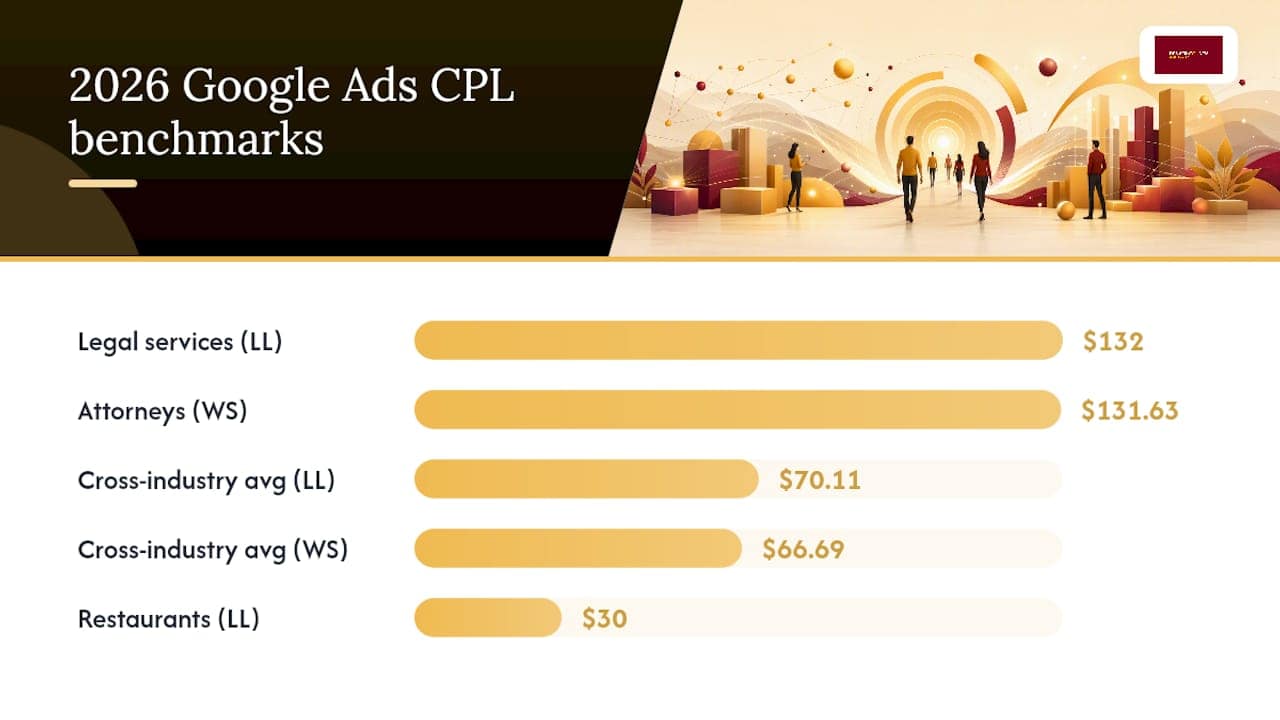
That gap between $66.69 and $70.11 across two respected sources isn’t a contradiction. It reflects different sample sets and methodology, and it’s a useful reminder that any single benchmark number is a rough guide, not gospel.
Average CPL across industries: roughly $67 to $70, depending on the data source.
Here’s how that breaks down by category, using figures from both benchmark reports:
Why the spread? Attorneys pay more because a single client can be worth tens of thousands of dollars, so bidding aggressively on competitive keywords still pencils out. A home services contractor in Denver isn’t chasing a $50,000 case; they’re chasing a $400 furnace repair, so the entire keyword and bidding strategy looks different from day one.
A few things to keep in mind when you read any benchmark table, including this one:
- Benchmarks are diagnostic tools, not performance targets. If your CPL runs well above your vertical’s range, the problem is usually account structure, Quality Score, or broken tracking, not an inherently expensive market.
- Geographic market moves the number substantially. A plumber in a dense metro area competes with more advertisers than one in a smaller town, and that competition shows up directly in cost-per-click.
- Seasonality matters. Home services CPL often spikes in early summer and late fall when demand surges and every competitor raises bids at the same time.
- Compare cost per qualified lead against these benchmarks, not raw form fills, or you’ll draw the wrong conclusion about whether your campaign is actually healthy.
If you run a Denver-area electrical business, for example, checking your numbers against electrician-specific Google Ads benchmarks will tell you far more than the blended cross-industry figure ever could.
What Drives Your Cost Per Lead Up or Down
Seven levers determine where your CPL lands, and you control most of them directly.
- Keyword competitiveness. “Emergency plumber near me” costs more per click than “plumbing tips,” because it signals someone ready to hire today. High commercial intent always costs more, and it’s usually worth it.
- Quality Score. Google rewards ads and landing pages that match search intent with lower costs per click. A Quality Score of 3 can mean paying double what a competitor with a Quality Score of 8 pays for the identical keyword.
- Landing page alignment. Send a “kitchen remodel” search to a generic homepage instead of a kitchen-specific page, and your conversion rate drops, which drives your effective CPL up even if your cost-per-click stays flat.
- Audience targeting. Broad targeting without exclusions burns budget on people outside your service area or buying stage. Tight geographic and demographic targeting fixes this fast.
- Ad format choice. Lead form extensions capture more raw volume but often lower-quality submissions, while sending traffic to a dedicated landing page filters harder, usually raising cost-per-lead but improving lead quality.
- Geographic market. Denver’s home services market is more competitive than a smaller Colorado town, and that competition bakes directly into your cost-per-click.
- Account structure. Cramming every service into one ad group with generic keywords dilutes relevance. Splitting HVAC repair, installation, and maintenance into separate, tightly themed ad groups improves Quality Score across the board.
Landing page fixes and negative keyword cleanup are quick wins you can implement this week. Account restructuring and building out dedicated service pages take longer, but they compound over months.
Budgets and the Timeline to a Stable CPL
Most small businesses starting fresh should budget $20 to $50 per day, which works out to roughly $1,000 to $2,500 per month for meaningful testing. That’s enough volume for Google’s algorithm to gather data without burning through your entire marketing budget on an unproven campaign.
Here’s a realistic ramp schedule for your first 90 days:
- Weeks 0 to 2: Launch with Search campaigns only. Focus entirely on conversion tracking accuracy, not results. If your tracking is wrong, everything downstream is wrong too.
- Weeks 2 to 6: Let Smart Bidding gather data. Resist the urge to change bids daily. Review search terms weekly and add negative keywords, but leave the bidding strategy alone.
- Weeks 6 to 12: Evaluate true performance against your vertical benchmark. This is when you decide whether to scale budget, test Performance Max, or restructure underperforming ad groups.
Most accounts need a 30 to 90 day window for Smart Bidding to stabilize. Importing offline “closed-won” conversions during this window meaningfully improves the quality of Google’s bidding signal, because the algorithm starts optimizing toward actual customers instead of raw form fills.
If you’re mapping out your first Google Ads budget as a home services contractor, a practical budget guide for small businesses walks through the math in more detail.
Choosing Campaign Types and Bidding Strategies
Search campaigns remain the right starting point for nearly every small business. They capture people actively typing what they need into Google, and that intent converts at a higher rate than almost any other channel. Search traffic from Google typically converts at 2 to 3 times the rate of social traffic, which explains why a higher CPL on Search is often still the better deal.
Performance Max campaigns expand your reach across Search, Display, YouTube, and Gmail simultaneously, using Google’s AI to find conversions wherever they happen. The tradeoff is control: you hand Google’s algorithm the keys, and it performs only as well as the data you feed it. Start with Search campaigns before adding Performance Max, and only introduce it once conversion tracking and lead qualification are reliable.
Smart Bidding itself comes in a few flavors worth understanding:
- Maximize Conversions works well early, when you need volume and data before optimizing for cost.
- Target CPA fits once you have enough conversion history (generally 30+ conversions in the last 30 days) to give Google a realistic cost target.
- Value-based bidding is the most advanced option, and it requires feeding Google actual deal values, not just conversion counts, so the algorithm can chase your highest-value leads instead of just the most leads.
Lead form extensions versus a dedicated landing page is its own decision. Google’s “More volume” lead form setting captures more submissions but often lower intent; “More qualified” tightens that up at the cost of raw numbers.
Pro Tip: Don’t turn on Performance Max until your tracking is airtight. Feeding an AI-driven campaign bad conversion data just means it optimizes faster toward the wrong outcome.
A Checklist to Lower Your Cost Per Lead
Work through these in order. Each step builds on the one before it, and skipping ahead usually means wasted spend.
- Confirm tracking accuracy first. Nothing else on this list matters if your Google Tag, enhanced conversions, or offline import isn’t working correctly.
- Rebuild your landing page around one specific service. A page built for “emergency water heater repair” will always outconvert a general “plumbing services” page for that search term.
- Clean up keyword match types. Broad match without smart negative keyword lists burns budget on irrelevant searches. Tighten to phrase match where volume allows.
- Add negative keywords weekly. Review your search terms report every week for the first two months. This single habit often cuts wasted spend by a meaningful margin.
- Layer in audience signals. Add in-market and affinity audiences as observation layers to help Smart Bidding understand who converts best.
- Adjust bids by location and device performance, once you have enough data to see clear patterns.
Test one variable at a time: headline copy, form length, call-to-action wording, or lead form versus landing page. Judge results by lead quality, not just raw conversion count, or you’ll optimize yourself into a pile of cheap, useless leads.
Pro Tip: During Google’s learning period, make one change at a time and wait at least a week before judging the result. Changing five things simultaneously resets the algorithm’s learning and makes it impossible to know what actually worked.
Setting Up Tracking That Makes CPL Meaningful
A CPL number is only as trustworthy as the tracking behind it. Here’s the setup that gets you there:
- Install the Google Tag across your entire site, not just the contact page.
- Turn on Enhanced Conversions, which matches hashed customer data to improve conversion accuracy even when cookies are blocked or limited.
- Capture the GCLID (Google Click Identifier) on every form submission and store it in your CRM.
- Set up offline conversion import so that when a lead becomes a paying customer weeks later, that outcome flows back into Google Ads.
The flow looks like this: a searcher clicks your ad, lands on your page, and their GCLID gets captured invisibly in a hidden form field. That GCLID travels into your CRM alongside their contact details. When your sales team closes the deal, you upload that closed-won record back to Google, tagged with the original GCLID. Google now knows which specific ad, keyword, and campaign produced an actual paying customer, not just a form fill.
Google itself recommends this exact sequence before layering on value-based bidding or Performance Max, because the AI performs only as well as the signals you give it.
Pro Tip: Prioritize importing “closed-won” data over every other offline signal. That single data point teaches Google’s bidding algorithm what an actual customer looks like, not just what a form-filler looks like.
Why Your CPL Might Be Higher Than It Should Be
The most common mistake is judging campaign performance during the first two weeks, before Smart Bidding has enough data to optimize. Panic-changing bids or pausing keywords during this window resets the learning process and often makes CPL worse, not better.
The second mistake: sending every click to your homepage. A generic homepage forces visitors to hunt for relevance, and that friction tanks conversion rates, which mathematically inflates your CPL even if cost-per-click stays low.
Ignoring the search terms report is another quiet budget killer. Broad match keywords without weekly negative keyword maintenance will absolutely burn spend on searches that have nothing to do with your service.
Counting raw leads instead of qualified leads creates a false sense of security. A campaign that looks cheap on paper because it’s generating 100 raw form fills a month might actually be expensive once you realize only 12 of those are real prospects.
Finally, businesses frequently turn on every Google Ads feature at once, Performance Max, automated bidding, broad match, all simultaneously, without a stable measurement foundation underneath. That combination amplifies whatever tracking gaps already exist, rather than fixing them.
Breaking Down CPL by Device, Location, and Audience
Aggregate CPL numbers hide the segments actually driving your results. Google Ads lets you slice performance three critical ways, and each reveals something different.
Device segmentation often shows mobile converting at a lower rate but higher volume than desktop for home services searches, since people search for “plumber near me” from their phone during an actual emergency. If mobile CPL runs high, check your mobile page speed and click-to-call button placement before touching bids.

Location segmentation reveals which zip codes or neighborhoods produce your cheapest, highest-quality leads. A Denver contractor might find that leads from Highlands Ranch convert at half the CPL of leads from downtown Denver, simply due to less advertiser competition in that geography.
Audience segmentation shows whether in-market audiences, remarketing lists, or demographic layers are pulling their weight. If a particular audience segment shows a CPL twice your average with no quality improvement to show for it, that’s a clear signal to adjust bid modifiers downward.
Review these three segments monthly, not weekly. Weekly review invites overreaction to normal statistical noise; monthly review reveals actual patterns worth acting on.
Real Improvements from Campaign Optimization
The pattern that shows up again and again: businesses that fix tracking and landing pages before touching bidding strategy see the biggest CPL improvements, often within the first 60 to 90 days.
A typical sequence looks like this. A home services business launches with a generic homepage as its landing page and broad match keywords with no negative keyword list. CPL runs well above the vertical benchmark. The fix isn’t a bidding change, it’s building a dedicated service-specific landing page and tightening match types. Conversion rate improves, and CPL drops accordingly, because the math of CPL is inseparable from conversion rate.
The second common improvement comes from offline conversion import. Once a business starts feeding closed-won deals back to Google, lead quality often improves within 60 to 90 days as the bidding algorithm learns to chase actual customers instead of any form submission. This is the single highest-leverage tracking change most small businesses skip entirely.
An HVAC contractor evaluating this exact playbook can find vertical-specific guidance in a local HVAC lead generation resource that walks through the same principles applied to seasonal demand swings.
The Part Nobody Tells You About Lowering CPL
Most advice on cutting cost per lead focuses on the wrong lever first: bidding. Marketers obsess over Target CPA settings and bid adjustments before they’ve fixed the landing page or verified tracking, and that’s backward. Smart Bidding is only as smart as the data you hand it. Feed it garbage conversion signals, and it will confidently, efficiently optimize toward garbage.
The conventional wisdom that Performance Max is a shortcut to lower CPL deserves pushback. It’s a powerful tool once your measurement foundation is solid, but turned on too early, it amplifies whatever tracking gaps already exist across five channels instead of one. That’s not a shortcut. That’s a faster way to lose money.
If you take one thing from this, prioritize tracking accuracy and landing page relevance over bidding strategy tweaks. A perfectly tuned Target CPA campaign feeding on bad conversion data will always underperform a mediocre bidding setup with rock-solid tracking and a landing page built for the exact search intent behind the click.
Get a Lead-Ready Website Built for Google Ads
Everything in this article assumes your landing page can actually convert the traffic you’re paying for, and that’s where most Google Ads budgets quietly leak money. Denvercountywebdesign builds custom, conversion-focused websites for Colorado home service businesses that own their site outright, with no monthly fees holding you hostage to an agency relationship.

Instead of sending Google Ads traffic to a slow, generic template site, you get a fast, mobile-ready page built around the exact service someone searched for, whether that’s emergency plumbing in Denver or a kitchen remodel quote in Arvada. Denvercountywebdesign also handles local SEO and Google Business Profile management alongside web design, so your organic visibility and paid campaigns work together instead of competing for the same budget. If you’re in the Brighton area and ready to see what a lead-focused landing page actually looks like, request a free SEO audit and see exactly where your current site is losing potential customers before they ever fill out a form.
Sources
- Google Ads cost per lead benchmarks and analysis — WordStream
- Google Ads for Lead Generation: 2026 Operator’s Guide — Elevarus
- Average cost per lead by industry (2026 Benchmarks) — LanderLab
- Advantages of Google Ads offline conversion tracking — CustomerLabs
FAQ
Is $20 a Day Good for Google Ads?
Twenty dollars a day works as a starting test budget for a low-competition local service, but it’s on the low end for most verticals. Most small businesses see more reliable data with $20 to $50 per day, or roughly $1,000 to $2,500 monthly.
What Is a Reasonable Cost Per Lead?
A reasonable CPL depends entirely on your vertical: home services typically run $40 to $75, while legal services often exceed $130. Compare your number against your specific industry benchmark, not the blended cross-industry average of roughly $67 to $70.
Is $10 a Day Enough for Google Ads?
Ten dollars a day rarely generates enough clicks or conversions for Smart Bidding to gather meaningful data, especially in competitive markets. It can work for extremely narrow, low-cost local niches, but most businesses need at least $20 daily to see real signal.
Is $500 Enough for Google Ads?
Five hundred dollars can fund a short test campaign, roughly two to three weeks at $20 to $25 per day, enough to gather early signal but not enough to reach the 30 to 90 day window Smart Bidding typically needs to stabilize. Treat it as a diagnostic test, not a full campaign launch.
How Long Does It Take to Lower Cost Per Lead?
Most accounts see meaningful CPL improvement within 60 to 90 days, particularly after fixing tracking and landing pages and allowing Smart Bidding to complete its learning period. Offline conversion import often improves lead quality signals within that same 60 to 90 day window.
Recommended
- Google Ads Budget for Small Businesses: A Practical Guide – Denver County Web Design
- Google Ads for Contractors: Get Local Leads Fast – Denver County Web Design
- Google Ads for Electricians: Local Leads in 2026 – Denver County Web Design
- HVAC Google Ads for Contractors: Local Lead Playbook – Denver County Web Design



