Your Google Ads budget is the daily dollar amount you tell Google to spend per campaign, and for most small businesses, the right starting point is typically a moderate daily spend, which translates to several hundred to over a thousand dollars per month. Multiply your daily budget by 30.4 to get your monthly estimate. That one formula drives every decision in this guide.
A few things to know before you set a number:
- Local service businesses (plumbers, electricians, landscapers) typically start at $500–$3,000/month for lead generation.
- Most SMBs land in the $1,000–$10,000/month budget range once campaigns are running.
- New accounts should start lean, prove the math, then scale.
- Google may spend up to twice your daily budget on high-traffic days, but your monthly cap holds at daily × 30.4.
Pro Tip: Before you pick a number, check your average cost per click (CPC) for your target keywords in Google Keyword Planner. Your daily budget should be at least 5× that CPC to generate enough clicks to learn from.
Table of Contents
- How your Google Ads budget actually works
- How to set a Google Ads budget for your small business
- Quick formulas and benchmarks you can use right now
- How to monitor and optimize your spend over time
- Common budget mistakes small businesses make
- What needs to be in place before you commit ad spend
- Key Takeaways
- What actually works when budgeting for local service ads
- Denvercountywebdesign can set and manage your Google Ads budget
- Useful sources and tools
How your Google Ads budget actually works
Google does not spend your budget in a straight line. Understanding the mechanics saves you from billing surprises and wasted spend.

Daily budgets and the 30.4 multiplier
You set an average daily budget per campaign. Google uses 30.4 (365 days ÷ 12 months) as the monthly multiplier. So a $30/day budget carries a $912 monthly cap. According to Google’s spending limits documentation, your billed cost will never exceed that monthly cap, even if served costs briefly run over.
Overdelivery: the 2× rule
On days when search volume spikes, Google can spend up to twice your daily budget to capture traffic. A $30/day budget could spend $60 on a busy Monday. That is fine because Google compensates by spending less on slower days, keeping the monthly total at or below $912. You pay for results, not the overage.
Ad scheduling and pacing
If your campaign runs only on weekdays or specific hours, Google still paces toward the full monthly cap based on the average days per month, not just the active days. To align your monthly target with actual active days, divide your intended monthly spend by the average days per month and set that as your daily budget.
Campaign total budgets vs. daily budgets
| Budget Type | How It Works | Best For |
|---|---|---|
| Daily budget | Spends up to daily × 2 per day; monthly cap = daily × 30.4 | Always-on campaigns, lead gen |
| Campaign total budget | Spends to hit a fixed total across the campaign flight | Promotions, seasonal events |

One critical note: campaign total budgets are irreversible after creation. Choose the type carefully before you launch.
Where to find your budget report
Inside Google Ads, go to Tools → Budget Report. It shows your pacing against the monthly cap, projected end-of-month spend, and any days where overdelivery occurred. Check it weekly.
How to set a Google Ads budget for your small business
This is the workflow that turns a business goal into a daily number you can actually enter into Google Ads.
-
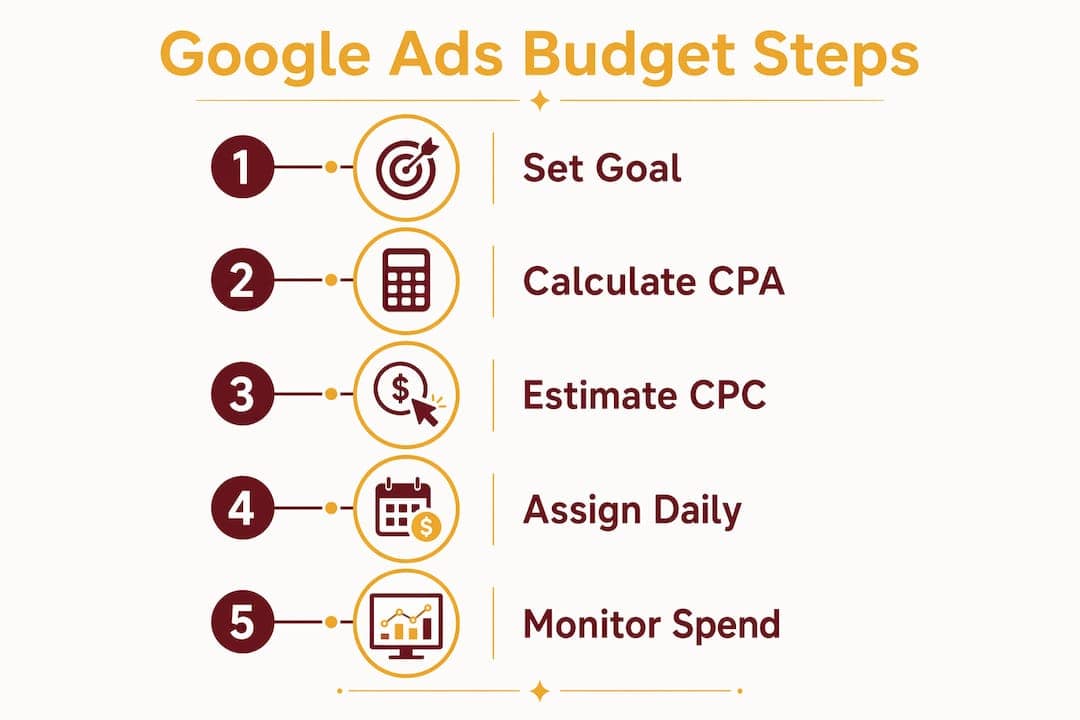
Define your goal. How many leads or sales do you need per month? What is each one worth? A plumber who closes 30% of leads and earns $400 per job thinks differently about budget than an e-commerce store with a $25 average order.
-
Estimate your target CPA. Target CPA (cost per acquisition) is the most you can profitably pay for one conversion. If a booked job is worth $400 and your close rate is 30%, your allowable cost per lead might be $60–$80.
-
Apply the core formula. Use this to work backward from your goal:
Example: You want 20 leads/month at a $70 target CPA. Monthly budget = 20 × $70 = $1,400. Daily budget = $1,400 ÷ 30.4 = $46/day.
-
Check the minimum daily budget rule. Your daily budget should be at least 5× your average CPC. If your keywords average $8/click (common for home improvement), your minimum is $40/day. If your formula gives you less than that, either raise the budget or narrow your keyword list.
-
Allocate across campaign types. A practical split for small service businesses:
- Brand campaigns: 10–15% (protect your name, the cheapest clicks)
- Prospecting/search: 60–70% (your main lead driver)
- Remarketing: 15–25% (re-engage site visitors at lower CPC)
-
Set a test budget first. New campaigns need data before automation can help. Run at your calculated daily budget for 30 days before making major changes. Smart Bidding needs 15–30 conversions per month to learn reliably, and many practitioners use 30+ as a safer threshold.
Pro Tip: If your budget math produces a number below $20/day, you likely need to either focus on fewer, tighter keywords or accept a longer test window before you have enough data to optimize.
Quick formulas and benchmarks you can use right now
Every formula you need, in one place.
Core formulas:
- Monthly spend = daily budget × 30.4
- Monthly budget = target conversions × target CPA
- Daily budget = monthly budget ÷ 30.4
- Clicks per day = daily budget ÷ average CPC
- Minimum daily budget = average CPC × 5
Industry CPC benchmarks (Search Network, U.S.):
| Scenario | Avg CPC | Daily Budget (target: 10 conv/mo, $80 CPA) | Monthly Budget |
|---|---|---|---|
| Low CPC (e-commerce, travel) | ~$2.00 | $26/day | ~$800 |
| Medium CPC (home services) | ~$8.33 | $26/day | ~$800 |
| High CPC (legal, dental) | ~$9.87 | $26/day | ~$800 |
The monthly budget stays the same because it is driven by your conversion goal and CPA target, not your CPC. Higher CPCs simply mean fewer clicks per dollar, so your keyword selection and Quality Score matter more.
The average CPC across all Google Ads accounts on the Search Network is $5.42. Home and home improvement keywords average $8.33, and legal services top the list at $9.87.
Which tool to use:
- Google Keyword Planner: Estimate CPCs before you launch.
- Google Performance Planner: Forecast spend and conversion volume for existing campaigns.
- Google Budget Report: Monitor pacing and monthly cap usage in live campaigns.
How to monitor and optimize your spend over time
Setting a budget is the start. What you do in the following weeks determines whether that spend pays off.
Monitoring cadence:
- Daily: Check for anomalies (budget exhausted by noon, zero impressions, sudden CPA spike).
- Weekly: Review CPA vs. target, impression share lost to budget, and search term reports.
- 30-day: Evaluate conversion volume, Quality Score trends, and whether Smart Bidding has enough data.
- 60–90 days: For B2B accounts with longer sales cycles, wait at least 60–90 days before judging campaign performance, since attribution data takes time to mature.
When to increase your budget:
- CPA is at or below your target.
- Impression share lost to budget exceeds 20%. That signal means profitable traffic exists that you are not capturing.
- Conversion volume is consistent over at least 30 days.
When to pause or reallocate:
- CPA is 50%+ above target after 30 days and no structural changes have improved it.
- A campaign consistently underspends its budget (often a sign that Smart Bidding’s efficiency target is too tight).
Scale in 10–20% increments rather than doubling overnight. Large budget jumps reset Smart Bidding’s learning period.
Pro Tip: Smart Bidding treats your efficiency target (tCPA or tROAS) as the primary constraint. If your tCPA is set too low, Google will restrict spend before your daily budget is ever reached. If a campaign consistently underspends, loosen the efficiency target before raising the budget.
Common budget mistakes small businesses make
Most wasted ad spend comes from a short list of predictable errors.
- Launching without verified conversion tracking. If Google cannot see conversions, Smart Bidding has nothing to learn from. Verify tracking in Google Tag Manager or Google Ads before spending a dollar.
- Setting budgets too small for automation. A $5/day budget on a $5 CPC keyword gives you one click per day. That is not a campaign; it is a data void. Meet the 5× CPC minimum.
- Raising the budget to fix a high CPA. More spend on a broken campaign produces more expensive leads. Fix the landing page, keyword match types, or ad copy first.
- Skipping negative keywords. Irrelevant clicks drain budget fast. Build a negative keyword list before launch, not after you have spent $300 on junk traffic.
- Ignoring seasonality. A roofing company that keeps a flat budget through winter and spring misses peak demand. Treat your budget as a living document and plan seasonal increases 4–6 weeks ahead.
- Choosing the wrong bidding strategy. Manual CPC gives you control but requires constant attention. Automated strategies like Maximize Conversions or Target CPA work well once you have conversion data, but they need that 30+ conversions/month threshold to perform reliably.
What needs to be in place before you commit ad spend
Spend without this checklist in place is money at risk.
- Conversion tracking verified. Test every conversion action (form submit, phone call, purchase) and confirm it fires correctly in Google Ads and Google Analytics.
- Primary vs. secondary conversions separated. Use high-intent actions (booked call, form submission) as your primary bidding signal. Track softer actions (page views, scroll depth) as secondary, for reporting only.
- Analytics and CRM cross-check. Compare Google Ads conversion counts against your CRM or booking system monthly to catch double-counting or missed fires.
- Landing page match. The page a visitor lands on must match the ad’s promise. A generic homepage for a “Denver emergency plumber” ad will kill your Quality Score and conversion rate.
- Staffing readiness. If your ads generate 30 calls a week and you can only handle 10, you are paying for leads you cannot close. Confirm capacity before scaling.
- Weekly reporting plan. Assign someone to review spend, CPA, and impression share every week. Campaigns left unattended for 30+ days routinely drift off target.
Pro Tip: Before running ads, get a free site audit to confirm your landing pages are conversion-ready. A slow or poorly structured page wastes every dollar you spend driving traffic to it.
Key Takeaways
Setting the right Google Ads budget starts with the formula monthly budget = target conversions × target CPA, then converting to a daily figure and verifying your tracking before spending a dollar.
| Point | Details |
|---|---|
| Core budget formula | Monthly budget = target conversions × target CPA; daily = monthly ÷ 30.4. |
| Starter ranges | Local service SMBs typically start at $500–$3,000/month; most SMBs land in the $1,000–$10,000 range. |
| Minimum daily budget | Set daily budget at 5× your average CPC to generate enough data for optimization. |
| Scale safely | Increase budgets in 10–20% increments; wait for 30+ conversions/month before enabling Smart Bidding. |
| Denvercountywebdesign | Offers Google Ads campaign setup and management for home service businesses in Colorado, paired with conversion-ready landing pages. |
What actually works when budgeting for local service ads
Most guides treat Google Ads budgets as a math problem. The math matters, but the bigger issue is sequencing. Contractors and home service businesses that struggle with paid search usually have the same problem: they set a budget before their tracking, landing page, and conversion process are ready to receive traffic.
The 30.4 multiplier and the 5× CPC rule are not complicated. What is harder is resisting the urge to judge a campaign after two weeks, or to double the budget when leads slow down instead of fixing the underlying conversion issue. Patience and discipline in the first 60–90 days determine whether a campaign becomes profitable or gets abandoned.
The other thing most guides understate: your landing page is part of your budget. A page that converts at 2% instead of 5% effectively triples your cost per lead. For local service businesses, that gap is often the difference between a campaign that pays for itself and one that drains cash. Fixing the page is usually faster and cheaper than raising the budget.
Denvercountywebdesign can set and manage your Google Ads budget
Getting your paid search campaigns right from day one, with proper tracking, a conversion-ready landing page, and a budget calibrated to your actual lead goals, is exactly what Denvercountywebdesign does for home service businesses across Colorado.

A free audit covers your budget health, conversion tracking setup, and quick wins you can act on immediately. You will know within days whether your current spend is working or leaking. The engagement includes a defined test period, weekly reporting on CPA and impression share, and budget recommendations tied to your actual job value, not generic benchmarks.
Home service contractors in the Denver metro, from Commerce City to Littleton, get landing pages built to convert paid traffic and Google Ads campaigns managed to hit real CPA targets. Request your free audit and find out what your budget should actually be doing for your business.
Useful sources and tools
Start with these resources to go deeper or run your own calculations:
- Google Ads Help: About spending limits — Official documentation on daily and monthly caps, overdelivery, and billed vs. served costs. Open this first if you want to understand how Google actually charges you.
- Google Ads Help: Budgets overview — Covers average daily budgets, the 30.4 multiplier, and overdelivery behavior.
- Google Ads Performance Planner (inside Google Ads under Tools) — Use this to forecast spend and conversion volume for existing campaigns before scaling.
- Google Keyword Planner (inside Google Ads under Tools) — Use this before launch to estimate CPCs and validate that your planned budget meets the 5× CPC minimum.
- PPC Budget Planning 101 — Practical guide with starter budget ranges and reallocation frameworks.
- WordStream: Google Ads cost benchmarks — Industry-level CPC and cost-per-lead data across major verticals, useful for benchmarking your target CPA.