Ownership comes down to one thing: who controls the accounts and access, not who paid the invoice. If your agency holds the domain registrar login, the hosting account, or the only working copy of your site files, you don’t have full ownership no matter what the contract says. The tests below prove control in about an hour.
TL;DR:
- Ownership requires controlling all critical accounts, including domain registrar, hosting, source code repository, and analytics, with verified access and correct contact info.
- Verifying ownership involves performing five tests: independent login, making test edits, rebuilding the site locally, deploying on staging, and revoking access to confirm control.
- Contract language alone does not guarantee ownership; specific transfer of rights and clear asset handovers are necessary, with registration as a safeguard for custom content.
- If control gaps are found, promptly export backups, switch account ownership to company email, request formal asset transfers, and plan migration with DNS and restore tests in advance.
- Proper ownership is an operational process, not just legal language, and regular control checks prevent costly disputes and ensure full site independence.
Table of Contents
- Who Owns My Website: The Accounts You Must Personally Control
- How Do You Verify You Actually Control Your Website?
- What Contract Language Actually Transfers Ownership?
- What To Do If You Don’t Control an Asset Right Now
- How Denver County Web Design Handles Handover and Ownership
- The Handover Gap Nobody Talks About
- Get a Free Account Map and Ownership Gap Check
- Primary Sources and Checklists to Consult Next
- Sources
- FAQ
Who Owns My Website: The Accounts You Must Personally Control
You don’t own a website because you paid for it. You own it because your name sits on the accounts that run it. Here’s the full inventory to check, asset by asset.
- Domain registrar: Confirm the registrant name, account owner email, billing method, and recovery email all point to your business, not the agency’s. Multi-factor authentication should be tied to a device your team controls.
- DNS records: You need direct access to view and export records, and to edit A, CNAME, and TXT entries without asking the agency for a favor.
- Hosting and deployment: Someone at your company should hold the billing role and admin access, with full visibility into backups and every environment (production, staging, development).
- Source code repository: You need the repo URL, commit history, build instructions, and a list of required dependencies, not just “we’ll send you a zip file if you ever leave.”
- CMS admin access: A named admin account tied to a company email address, with permission to publish and roll back changes.
- Design and content files: Editable source files (Figma, Adobe XD, or Photoshop originals), exported media, and receipts for any paid licenses.
- Analytics, Search Console, and ad accounts: These must be properties your business owns, with full historical access, not a view granted from the agency’s master account.
- Third-party licenses: A list of every paid plugin, font, and stock image, with clear notes on who holds the renewal.
- Operational documentation: Password manager policy, deployment steps, and emergency contacts, so a new developer isn’t starting from zero.
A thorough handoff ties every one of these items to a named owner and a way to verify it, not just a promise that “you’ll have access.”
How Do You Verify You Actually Control Your Website?
Checking a box on a handover document proves nothing. Running these five tests does. Each one produces evidence you can point to later if a dispute comes up.
- Independent access test. Open a clean browser (or a different device entirely) and log into your registrar, hosting account, repo, CMS, and analytics using only credentials you control. Confirm the recovery contact and billing owner both show your business information.
- Editing test. Make a small, agreed change in the CMS, publish it, verify it went live, then revert it. Record who made the change and when.
- Clean build test. Clone the repository on a machine with no help from the agency and follow the build instructions to produce a working local or staging copy. Note any private packages or missing config files that block the build.
- Staging deployment test. Deploy the site to a non-production environment you control, and confirm integrations, forms, email, and Search Console still function.
- Access-revocation test. Remove an agency user from a low-risk account, confirm the site still runs, then restore access. This proves you can govern who has keys to your own property.
Pro Tip: Run the clean build test before you sign a final invoice, not after. A usable build needs more than repo access. It needs environment variables, dependency lists, and any private package credentials, and those are exactly what get left out of a rushed handoff.
Passing all five tests is a fair benchmark for real independence. If even one fails, you’re renting your website, not owning it.
What Contract Language Actually Transfers Ownership?
A signed invoice does not transfer copyright. Only specific contract language does, and the difference between “license” and “assignment” is the whole ballgame.
A license lets you use something the agency still owns. An assignment transfers ownership outright. For custom deliverables, logos, page layouts, and written copy, you want an explicit written assignment of rights, not a license that can be revoked or restricted later. Many agencies retain reusable internal tools or frameworks unless the contract specifically assigns them to you, and that’s often reasonable. What’s not reasonable is vague language that leaves your homepage design in the same bucket as their internal template library.
Your statement of work should spell out:
- Named account owners for every asset in the inventory above
- A firm handover window with deadlines, not “when we get to it”
- A complete license inventory for every plugin, font, and stock image
- What’s explicitly excluded (the agency’s proprietary frameworks or pre-existing code libraries)
Copyright registration adds another layer of protection. The Copyright Office allows custom website content and HTML to be registered as a compilation or literary work when there’s enough original selection and arrangement. Registration requires an application, a fee, and a deposit, usually submitted as a PDF package that preserves how the site is organized and navigated. Registration does not automatically cover style sheets or non original elements, so don’t assume it blankets everything on the page.
What To Do If You Don’t Control an Asset Right Now
If the tests above turned up a gap, don’t panic and don’t wait. Work through this in order.
- Map everything first. List every account, who currently holds it, and what evidence (or lack of it) you have for each one.
- Export what you can immediately. Pull backups, download media files, and enable MFA on anything already in your name.
- Switch to company email addresses for account ownership and recovery on anything still tied to a personal or agency inbox.
- Request formal transfers. Ask for the domain authorization code, full repo access or export, and license transfer documents for paid plugins and themes.
- Plan the migration. If hosting needs to move, verify the DNS transfer steps in advance and test a full restore on a staging server before you cut over.
- Escalate in writing if needed. Send a formal transfer demand, keep every invoice and email, and consider mediation or legal counsel if the agency stalls.
Pro Tip: Keep every communication in writing, even the friendly ones. A polite email thread asking for your registrar transfer code becomes evidence if this ever turns into a formal dispute.
How Denver County Web Design Handles Handover and Ownership
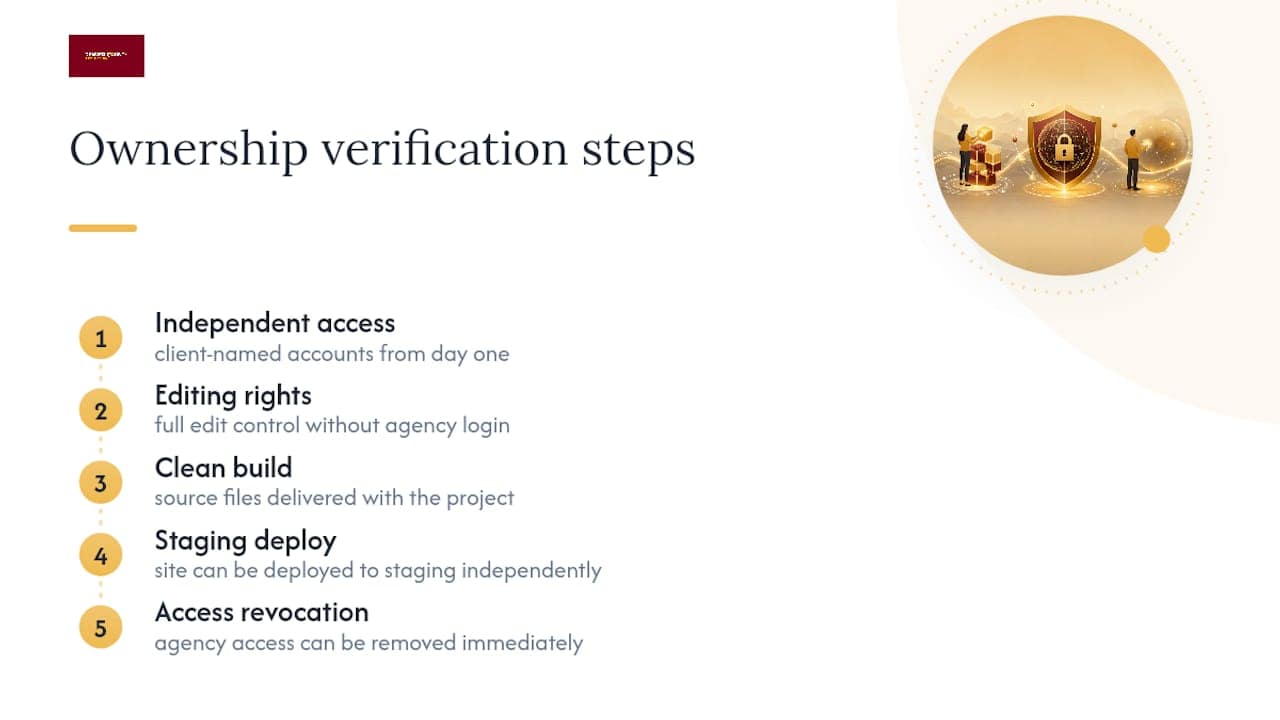
Denver County Web Design builds every contractor website on a simple premise: the client owns it, fully, with no monthly fee dangling control over their head. That means client-named accounts from day one, source files delivered as part of the project, and a documented handover that maps directly to the five tests above.
Notable organic traffic growth within a few months can result from technical SEO, Google Business Profile management, and Google Ads campaigns layered onto a site the client actually controls. The handover process is designed so a contractor could pass every verification test, independent access, editing, clean build, staging deploy, and access revocation, without a single follow-up call to the agency.
The Handover Gap Nobody Talks About
Most advice on this topic focuses on contracts, and contracts matter. But the real failure point isn’t legal language. It’s operational laziness. Agencies don’t usually steal websites on purpose. They just never build the habit of documenting handover the way they document design revisions.
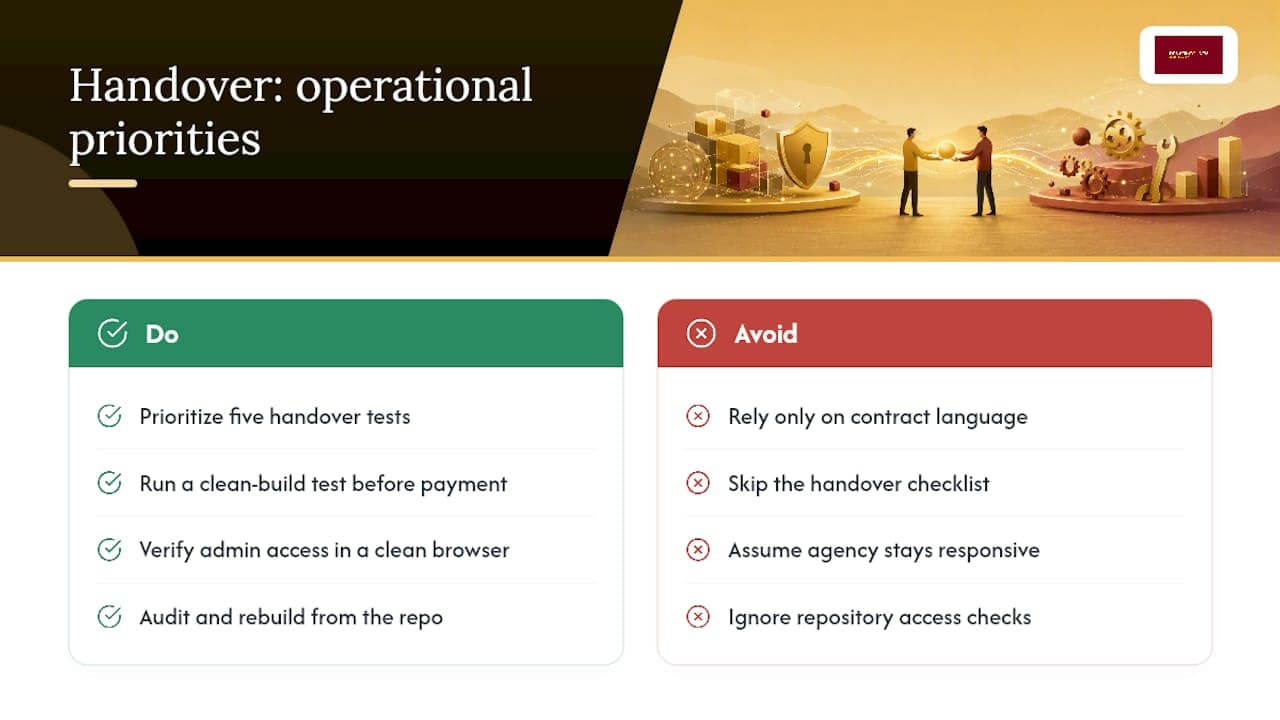
The conventional advice tells you to “get everything in writing.” Fine, but a contract clause promising you’ll receive admin access means nothing if nobody runs the clean build test before the final payment clears. I’ve seen the pattern play out the same way for home service business owners specifically: they’re focused on getting leads flowing, not auditing a repository, so the handover checklist gets skipped and the gap doesn’t surface until the agency stops answering emails.
Prioritize the five tests over the paperwork. A contract with perfect assignment language is worthless if you can’t actually log in from a clean browser and rebuild the site from scratch. Treat control as the evidence and the contract as the backup, not the other way around.
— Luis
Get a Free Account Map and Ownership Gap Check
You’ve just read what real ownership looks like. Denver County Web Design builds that standard into every project from day one, custom WordPress sites delivered with full client control and no monthly fee holding your accounts hostage. That’s the practical difference between a website you rent and one you own outright.

If you’re not sure where your business currently stands, request a free account map and gap check. It walks through the same inventory covered above, domain, hosting, CMS, repository, and licenses, and flags any account still sitting in someone else’s name. You’ll walk away with a prioritized list of what to fix first. Start with a free SEO and ownership audit or see how a Brighton, CO website built for full ownership actually works before you sign your next contract.
Primary Sources and Checklists to Consult Next
For registration questions, start with Copyright Office Circular 66 on registering website content as a compilation. For handover mechanics, the website handover and ownership checklist and the essential handoff items list both cover asset-by-asset evidence in more detail. Agencies rebuilding their own documentation process may also find value in AI tools built for agency workflows.
Sources
- Copyright Office Circular 66: Registration of Claims to Copyright
- Website handover and ownership checklist for clients
- Website handoff checklist: essential items to get at launch
FAQ
How Do I Know if I Own My Website?
Run the five control tests: independent access, an editing test, a clean build, a staging deployment, and access revocation. If you pass all five without agency help, you have real ownership.
Does Paying for a Website Mean I Own It?
Not automatically. Ownership depends on account control and contract language, specifically whether the agreement assigns rights to you rather than just licensing them.
What’s the Difference Between a License and an Assignment?
A license lets you use content the agency still legally owns. An assignment transfers ownership of that content to you outright, which is what you want for custom deliverables.
Can I Register My Website Content for Copyright Protection?
Yes. The Copyright Office allows custom website content to be registered as a compilation or literary work, typically submitted as a PDF deposit, though registration doesn’t cover non original elements like style sheets.
What Should I Do if My Agency Won’t Transfer My Domain?
Send a written transfer demand, document every account you’ve mapped, and keep all invoices and emails. If the agency continues to refuse, consult an attorney or pursue mediation before litigation.
Does Denver County Web Design Let Clients Keep Full Ownership?
Yes. Denver County Web Design delivers client-named accounts, source files, and documented handovers with no monthly fee, so clients control their domain, hosting, and CMS from launch day.